case study

📈 Case Study: How a Small Business Stopped a Major Cyber Attack

Cyberattacks are no longer the exclusive concern of large corporations — small businesses are increasingly targeted. In fact, 43% of cyberattacks in 2025 are aimed at small and medium-sized enterprises (SMEs). These attacks can cripple operations, steal sensitive data, and damage customer trust.

This case study explores how BrightWave Marketing, a small digital agency, successfully thwarted a major cyberattack in 2025 using licensed antivirus and cybersecurity solutions from Buy Software Hub. Their story demonstrates that with the right tools and strategy, even small businesses can defend against sophisticated threats.

🧩 The Challenge: A Sudden Threat

BrightWave Marketing, with just 15 employees, primarily relied on cloud collaboration tools and client databases for daily operations. One morning, they noticed unusual network activity:

  • Multiple unauthorized login attempts 
  • Suspicious file encryption on employee devices 
  • Phishing emails bypassing standard filters 

The team quickly realized they were under a ransomware attack, which could encrypt all client files and halt operations. With projects in progress and sensitive client data at risk, time was critical.

⚠️ CTA: Don’t wait until it’s too late! Secure your business against ransomware with licensed antivirus solutions from Buy Software Hub.

⚡ The Solution: Licensed Cybersecurity Tools in Action

BrightWave worked with Buy Software Hub to implement a multi-layered defense strategy. The solution included:

1. Kaspersky Endpoint Security Cloud Plus

  • Real-time monitoring of all devices 
  • AI-driven detection of malware and ransomware 
  • Automated device isolation to prevent spread 

2. AVG Business Security Cloud Edition

  • Anti-phishing protection for emails 
  • Cloud management console for centralized control 
  • Behavior-based detection to catch unknown threats 

3. Employee Training & Security Protocols

  • Phishing awareness workshops 
  • Enforced password policies 
  • Multi-factor authentication for critical systems 

Within hours, the combination of licensed software, centralized monitoring, and staff awareness neutralized the threat before any client data was compromised.

🛠️ How They Implemented the Protection

The implementation process was straightforward but strategic:

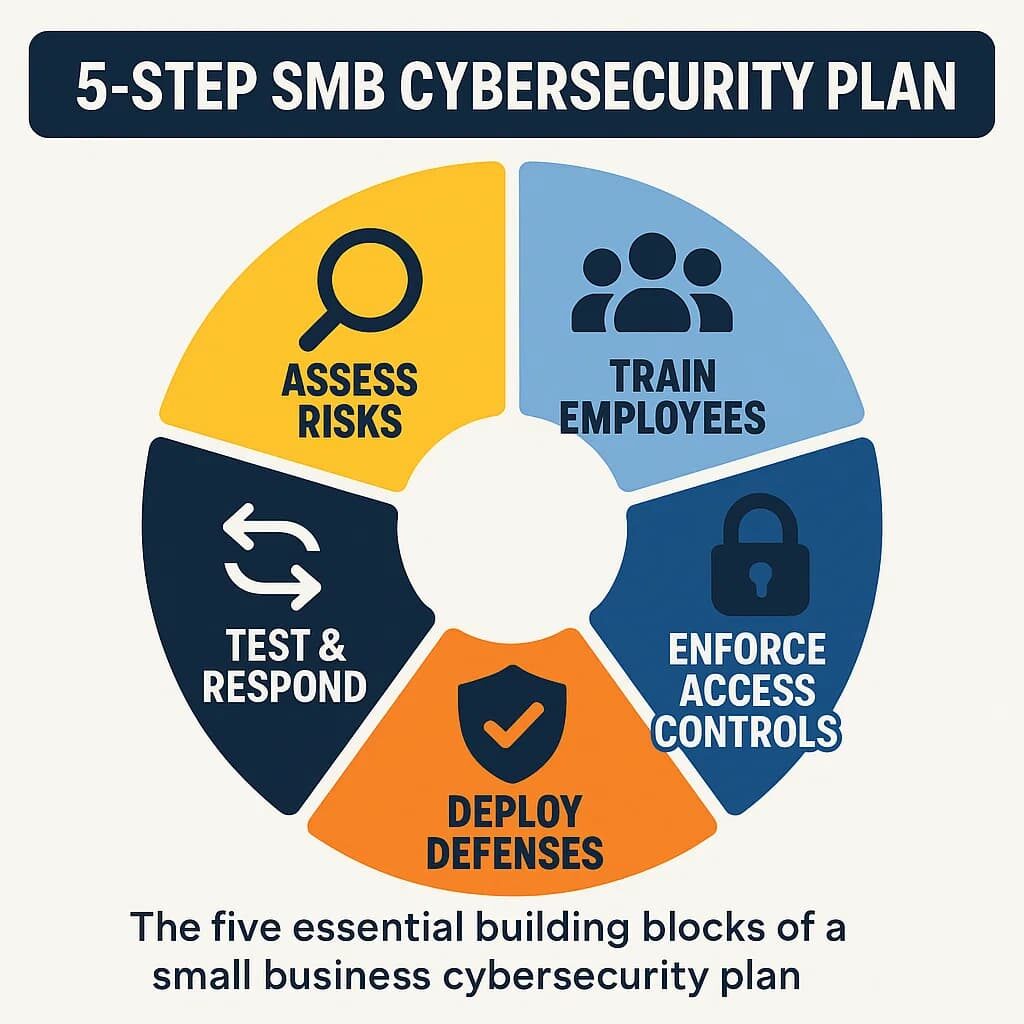
Step 1: Assess the Network

BrightWave conducted a full audit of their systems, identifying vulnerable endpoints and legacy software that could be exploited.

Step 2: Deploy Antivirus Across Devices

Using the cloud console, Buy Software Hub assisted in installing Kaspersky and AVG on all laptops, desktops, and servers. Automatic updates were enabled to ensure real-time protection.

Step 3: Configure Threat Response Policies

  • Devices with suspicious activity were automatically quarantined 
  • Email filters were enhanced to block phishing links 
  • Scheduled scans were set for all endpoints during off-hours 

Step 4: Train Employees

A quick training session showed staff how to spot phishing emails, avoid suspicious downloads, and report potential threats immediately.

Step 5: Continuous Monitoring

Centralized dashboards allowed BrightWave’s IT admin to track threats in real time and generate reports for compliance audits.

💬 CTA: Learn how your business can implement the same proactive security measures with expert guidance from Buy Software Hub.

💡 Benefits Realized

The impact of implementing licensed cybersecurity tools and protocols was immediate and measurable:

1. Ransomware Prevented

No client files were encrypted, and the attack was fully neutralized within hours.

2. Business Continuity Maintained

Projects continued without downtime, preserving client trust and revenue streams.

3. Increased Employee Awareness

Staff became vigilant against phishing, reducing the risk of human error in future attacks.

4. Centralized Security Management

IT administrators could now monitor all devices in one dashboard, simplifying compliance reporting.

5. Cost Savings

Avoided potential losses from ransom payments, downtime, and client compensation — demonstrating a clear ROI for licensed antivirus investment.

📈 Lessons Learned: Why Small Businesses Can’t Ignore Cybersecurity

  1. Small Businesses Are Prime Targets – Hackers know SMEs often have weaker defenses. 
  2. Proactive Measures Save Money – Investing in licensed antivirus is far cheaper than paying for recovery after an attack. 
  3. Employee Training is Crucial – Technology alone isn’t enough; human awareness completes the defense. 
  4. Centralized Monitoring is Key – Being able to see all endpoints and respond quickly prevents attacks from spreading. 

BrightWave’s experience proves that with proper planning, even a small team can implement enterprise-level security.

🔐 Conclusion

Cyberattacks don’t discriminate by business size. However, small businesses like BrightWave Marketing can successfully prevent major breaches by using licensed antivirus solutions, proper policies, and employee training.

2025 is a year where cybersecurity should be treated as a core business function, not just an IT responsibility. By adopting a proactive, layered approach, your business can stay protected, maintain client trust, and avoid costly downtime.

🚀 Call to Action

Protect your business like BrightWave did.

✅ Get licensed antivirus software from Kaspersky, AVG, Bitdefender, and more
✅ Implement centralized monitoring and threat management
✅ Train your employees in cyber hygiene and phishing awareness

💻 Visit Buy Software Hub today to secure your small business against cyberattacks and maintain uninterrupted operations in 2025 and beyond.

Best antivirus for your buisness

⚙️ The Ultimate Guide to Choosing the Right Antivirus Software for Your Business in 2025

🔍Why the Right Antivirus Matters More Than Ever

In 2025, cyber threats are no longer random — they’re strategic, AI-driven, and financially motivated. From ransomware attacks to credential theft, businesses of all sizes are now prime targets.

Choosing the right antivirus software isn’t just an IT decision — it’s a business survival strategy. The right solution can protect your data, employees, and customers while keeping your operations running smoothly.

But with so many products promising “advanced protection,” how do you pick the one that truly fits your business needs?

This guide breaks down exactly how to choose the best antivirus software for your business, with insights on features, licensing, scalability, and trusted options available from Buy Software Hub, your source for genuine, licensed security solutions.

🧠 Step 1: Understand Your Business Security Needs

Before comparing antivirus brands, start by analyzing how your company operates and what risks you face.

Ask Yourself:

  • How many employees and devices do we need to protect?

  • Are we working remotely or in-office (or both)?

  • Do we store customer data or financial records?

  • What are our compliance requirements (GDPR, HIPAA, etc.)?

For Example:

  • A startup may need lightweight protection that’s easy to manage.

  • A growing SME requires scalable, cloud-managed antivirus.

  • A corporation might need advanced endpoint detection and response (EDR).

Knowing your structure helps you avoid overpaying for features you don’t need — or worse, under-securing your business.

💬 CTA: Start your cybersecurity assessment today at Buy Software Hub and get matched with the perfect licensed antivirus for your business model.

🧩 Step 2: Evaluate the Essential Antivirus Features

Every good business antivirus should include more than just virus scanning. In 2025, here are the must-have features you can’t afford to skip:

1. Real-Time Threat Detection

Stops malware, ransomware, and phishing attacks before they spread.

2. Behavioral Analysis & AI Detection

Identifies suspicious activity, even from unknown or zero-day threats.

3. Centralized Management Console

Allows IT teams to monitor, update, and control all devices from a single dashboard.

4. Web & Email Protection

Blocks malicious websites, attachments, and fake login pages.

5. Data Encryption & Privacy Control

Safeguards sensitive files and prevents data leaks through USB drives or cloud syncs.

6. Automatic Updates & Patch Management

Ensures all systems stay protected without manual intervention.

7. Cloud-Based Deployment

Simplifies installation across remote or hybrid teams.

The best solutions integrate all of these into one seamless ecosystem, so you don’t need multiple vendors for different layers of protection.

🧱 Step 3: Compare the Top Antivirus Options for Businesses in 2025

Here are the industry-leading antivirus solutions trusted by global businesses — all available in genuine, licensed versions from Buy Software Hub.

🛡️ 1. Kaspersky Endpoint Security Cloud Plus

  • AI-Powered Defense: Learns and adapts to new threats in real time.

  • Centralized Management: Cloud-based console for monitoring multiple endpoints.

  • Data Encryption: Protects sensitive information across devices.

  • Device Control: Restricts unauthorized USBs and external hardware.

Best for: Small to mid-sized businesses with hybrid teams.

💬 CTA: Get Kaspersky Endpoint Security Cloud Plus at Buy Software Hub — fully licensed, affordable, and optimized for business-grade protection.

💼 2. AVG Business Security Cloud Edition

  • Smart Scanning: Detects malware, phishing, and ransomware using AI.

  • Cloud Console: Simple dashboard for managing all business devices.

  • Email Shield: Filters spam and prevents email-borne attacks.

  • Ransomware Protection: Blocks file encryption attempts automatically.

Best for: Startups and growing SMEs looking for reliable, easy-to-use security.

🧠 3. Bitdefender GravityZone Business Security

  • Advanced Threat Intelligence: AI-driven analysis across millions of devices.

  • Network Attack Defense: Prevents intrusions before they reach endpoints.

  • Sandbox Testing: Isolates and analyzes suspicious files safely.

  • Patch Management: Automatically updates OS and applications.

Best for: Enterprises or regulated industries needing advanced compliance and EDR.

🔒 4. Norton Business Advanced Security

  • Deep Learning Detection: Identifies polymorphic and fileless malware.

  • Identity Protection: Monitors for credential theft and fraud attempts.

  • Cloud Backup: Provides secure, encrypted backups for critical files.

Best for: Small teams or consultants managing client data.

💬 CTA: Compare these antivirus suites side-by-side at Buy Software Hub — get expert advice, volume discounts, and 100% genuine licenses for your organization.

⚡ Step 4: Choose the Right Licensing and Scalability

Licensing isn’t just about cost — it’s about control and compliance.

Common Licensing Options:

  • Single Device License: For freelancers or micro-businesses.

  • Business Multi-User License: Covers multiple endpoints with a single key.

  • Cloud-Based Subscription: Scalable per-user model ideal for remote teams.

Why Licensing Matters:

  • Keeps your software updated and compliant

  • Unlocks full features and 24/7 support

  • Ensures legality and avoids penalties from audits

Using cracked or unlicensed antivirus software is a major security risk — most pirated versions are embedded with hidden malware or keyloggers.

⚠️ Reminder: Always buy licensed antivirus software from verified resellers like Buy Software Hub to guarantee authenticity and continuous protection.

🧰 Step 5: Implement and Optimize Your Security System

Once you’ve chosen your antivirus solution, implementation is key.

1. Deploy Company-Wide

Install the antivirus on all workstations, laptops, and servers.

2. Enable Real-Time Monitoring

Activate live dashboards and automatic alerting.

3. Schedule Scans and Updates

Set daily or weekly scans during non-working hours.

4. Set Access Control Policies

Restrict admin privileges and enforce strong password policies.

5. Train Employees

Even the best software needs human awareness. Teach staff to recognize phishing and suspicious activity.

💡 Step 6: Measure and Evolve

Cyber threats change constantly. Review your antivirus performance quarterly and upgrade when necessary.

Look for:

  • Changes in threat volume or type

  • New features from your vendor (AI, zero-trust updates, etc.)

  • Integration needs with cloud or endpoint systems

Staying proactive ensures your business stays ahead of attackers — not one step behind.

🏆 Key Benefits of Choosing the Right Antivirus

  • 🔒 Complete Protection from malware, ransomware, and phishing

  • ⚙️ Centralized Management for simplified IT control

  • 🚀 Improved Productivity through reduced downtime

  • 💸 Cost Efficiency via scalable licensing

  • 📈 Compliance & Customer Trust by safeguarding sensitive data

Choosing right isn’t just about technology — it’s about peace of mind, continuity, and credibility.

💬 CTA: Ready to protect your business? Visit Buy Software Hub for licensed antivirus software tailored to your organization’s size, budget, and risk level.

🚀 Conclusion: Protect Today, Thrive Tomorrow

The digital world doesn’t wait — and neither do cybercriminals. The sooner your business deploys the right antivirus solution, the safer your data, revenue, and reputation will be.

Whether you’re a small business or an enterprise, the ideal antivirus should combine AI detection, cloud management, and scalability — exactly what solutions like Kaspersky Endpoint Security and AVG Business Security deliver.

🔐 Final Call to Action

⚙️ Your business deserves protection that’s as smart as your strategy.

At Buy Software Hub, you’ll get:
✅ 100% genuine antivirus licenses (Kaspersky, AVG, Bitdefender, Norton & more)
✅ Cloud deployment for easy remote management
✅ Expert setup and after-sales support
✅ Business pricing and volume discounts

💻 Visit Buy Software Hub today — and secure your business for the digital future.