multi layers security

🧰 Multi-Layered Protection: How to Build a Cybersecurity Fortress

🔍 Why Multi-Layered Cybersecurity Is a Must in 2025

In today’s digital landscape, cyber threats are no longer isolated attacks — they’re sophisticated, coordinated, and relentless. From ransomware to phishing scams and insider threats, businesses face attacks from every angle. A single security layer is no longer sufficient; your organization needs a multi-layered cybersecurity strategy.

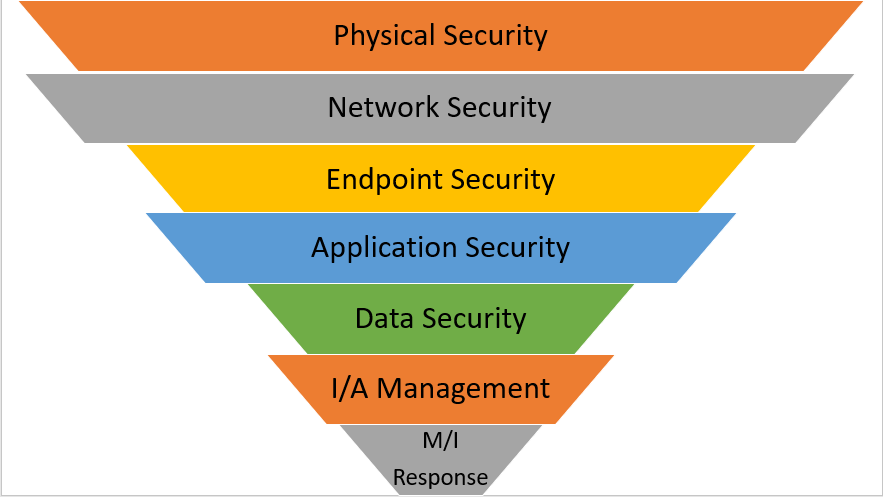
Think of it as building a fortress: the stronger and more layered the defenses, the less likely attackers are to breach your walls. Multi-layered protection combines antivirus, firewalls, endpoint security, email and network monitoring, and employee training — creating a holistic shield for your business operations.

At Buy Software Hub, we specialize in providing genuine, licensed security software that forms the backbone of these multi-layered defenses.

🛡️ Understanding Multi-Layered Cybersecurity

A multi-layered cybersecurity approach is all about defense in depth. Each layer works independently but also complements the others. Let’s break down the critical layers every business should implement:

1. Antivirus and Endpoint Protection

Antivirus software is your first line of defense, protecting desktops, laptops, and servers from malware, ransomware, and other threats. Modern endpoint protection goes beyond traditional scanning:

  • AI-driven real-time threat detection

  • Behavioral monitoring to catch zero-day attacks

  • Automated quarantine of suspicious files

💬 CTA: Protect your endpoints today with Kaspersky or AVG business licenses from Buy Software Hub — trusted by businesses worldwide.

2. Firewalls and Network Security

Firewalls act as digital gatekeepers, controlling traffic between internal systems and external networks. Advanced business firewalls:

  • Block unauthorized access

  • Monitor network traffic for anomalies

  • Integrate with endpoint software for holistic monitoring

Network management tools from brands like SolarWinds or Cisco Meraki, available at Buy Software Hub, help businesses proactively detect and neutralize threats before they cause damage.

3. Email and Web Security

Phishing attacks remain the top entry point for cybercriminals. Multi-layered protection requires:

  • Email filtering to detect suspicious attachments and links

  • Web filtering to block malicious websites

  • Real-time threat alerts

Solutions from AVG, Kaspersky, and Norton provide enterprise-grade email and web protection to keep employees and clients safe.

4. Data Encryption and Remote Backup

Data is your most valuable asset. Multi-layered security ensures that even if a breach occurs, your information remains protected:

  • Encryption: Secures sensitive files during storage and transit

  • Remote Backup: Cloud-based backups from providers like Acronis or Veeam ensure rapid recovery after incidents

💬 CTA: Safeguard your critical data today with Buy Software Hub’s remote backup solutions — secure, automated, and reliable.

5. Employee Awareness and Training

Even the best software can’t prevent human error. Regular training empowers employees to:

  • Identify phishing emails and scams

  • Use secure passwords and multi-factor authentication

  • Report suspicious activity promptly

Cybersecurity is only as strong as its weakest link — and often, that’s human behavior.

6. Continuous Monitoring and Threat Intelligence

A multi-layered defense is not “set it and forget it.” Continuous monitoring:

  • Detects anomalies in real-time

  • Provides insights into attack patterns

  • Supports proactive defense measures

Cloud-based dashboards and security analytics tools help IT teams manage threats efficiently, ensuring rapid response to any incident.

⚙️ How to Implement Multi-Layered Protection in Your Business

Step 1: Assess Risks and Requirements

Conduct a comprehensive cybersecurity audit to identify:

  • Number of endpoints and servers

  • Sensitive data locations

  • Potential attack vectors

Step 2: Choose Licensed, Enterprise-Grade Security Tools

Select solutions that integrate well:

  • Antivirus & endpoint protection: Kaspersky, AVG, Bitdefender

  • Firewalls and network tools: SolarWinds, Cisco Meraki

  • Backup & recovery: Acronis, Veeam

  • Collaboration & remote tools: Microsoft Teams, AnyDesk, TeamViewer

Step 3: Deploy and Configure

Install antivirus across all devices, configure firewalls, and set up email and web security rules. Automate updates wherever possible to minimize vulnerabilities.

Step 4: Train Employees

Run cybersecurity awareness programs and enforce policies such as strong passwords, 2FA, and reporting protocols.

Step 5: Monitor and Review

Use dashboards to track threats, scan reports, and system health. Schedule quarterly audits to identify gaps and improve defenses.

💡 Benefits of Multi-Layered Cybersecurity

  • 🔒 Comprehensive Protection: Multiple security layers reduce the chance of successful attacks.

  • Minimized Downtime: Quick detection and automated responses prevent operational disruption.

  • 📈 Compliance and Trust: Protect sensitive data to meet GDPR, HIPAA, or ISO standards.

  • 💸 Cost Efficiency: Preventing breaches saves millions compared to post-attack recovery.

  • 🧠 Employee Confidence: Staff feel secure and empowered to perform at their best.

Multi-layered cybersecurity transforms risk management from reactive to proactive — making businesses resilient against modern threats.

🔚 Conclusion

Building a cybersecurity fortress in 2025 requires more than just antivirus software. It’s about combining endpoint protection, firewalls, web and email security, encryption, backups, employee training, and continuous monitoring into a cohesive strategy.

Investing in multi-layered protection isn’t an expense — it’s a business-critical investment that safeguards your operations, reputation, and customer trust.

💬 CTA: Start building your cybersecurity fortress today with Buy Software Hub’s comprehensive security solutions. Licensed, reliable, and tailored for businesses of every size. Protect your data, protect your business.

unlicensed-software-701x526

🚫 Unlicensed Software: The Hidden Cybersecurity Threat You’re Ignoring

The Costly Risk of Going “Free”

In a world where businesses rely on digital tools for everything from accounting to communication, software is no longer optional — it’s essential. But many companies, in an attempt to save costs, turn to unlicensed or pirated software, thinking it’s a harmless shortcut.

What they often don’t realize is that using unlicensed software exposes their business to serious cybersecurity risks, operational disruptions, and legal liabilities. From malware infections to ransomware attacks, unlicensed software can quietly undermine productivity and damage reputation.

In this article, we’ll explore why unlicensed software is one of the most overlooked threats in modern business cybersecurity, and how investing in licensed, genuine software from trusted providers like Buy Software Hub can protect your company.

🔍 The Hidden Dangers of Unlicensed Software

1. Malware and Hidden Threats

Pirated software often comes bundled with malware, spyware, and keyloggers. Once installed, these threats can steal sensitive information, compromise customer data, or even give hackers full control of your system.

Real-life Example: A small business using unlicensed office tools unknowingly downloaded malware that encrypted critical files — resulting in downtime and costly recovery efforts.

2. Ransomware Exposure

Unlicensed software is a prime target for ransomware attacks. Hackers exploit vulnerabilities in outdated or cracked programs to lock your systems and demand hefty ransoms.

CTA: Don’t risk losing your critical data. Upgrade to fully licensed software from Buy Software Hub and safeguard your operations today.

3. Compliance and Legal Risks

Running unlicensed software violates copyright laws and can lead to hefty fines and legal actions. For regulated industries like healthcare, finance, or education, non-compliance can also result in severe penalties from authorities.

4. System Instability and Compatibility Issues

Pirated or unlicensed software often lacks updates and patches, leaving systems vulnerable and unstable. Crashes, file corruption, and incompatibility with other legitimate tools can slow down operations and frustrate employees.

5. Loss of Vendor Support

With unlicensed software, you cannot access technical support or updates, leaving your IT team to troubleshoot issues without official guidance. This increases downtime and makes recovery from cyber incidents more difficult.

⚙️ How to Avoid Unlicensed Software Threats

Step 1: Conduct a Software Audit

Start by reviewing all software installed across your business systems. Identify which programs are unlicensed or out-of-date.

Step 2: Replace Pirated Software

Switch to licensed software from trusted vendors like Microsoft, Adobe, Oracle, VMware, or Kaspersky. Buying from authorized resellers ensures your business gets genuine products and official support.

Step 3: Implement a Software Policy

Establish a company-wide software usage policy. Ensure all employees understand the risks of unlicensed software and follow best practices.

Step 4: Automate Updates

Enable automatic updates for all licensed software to patch vulnerabilities and reduce the risk of cyberattacks.

Step 5: Train Employees

Human error is a major contributor to cyber incidents. Provide regular training on safe software use, phishing awareness, and device security.

💬 CTA: Secure your business infrastructure by switching to fully licensed software solutions. Explore our wide range of authentic products at Buy Software Hub today.

💡 Benefits of Using Licensed Software

  1. Enhanced Security – Official software comes with regular patches, updates, and built-in antivirus integration, protecting your systems against modern threats.

  2. Legal Compliance – Avoid fines, audits, and legal liabilities by adhering to copyright and licensing laws.

  3. Reliability and Stability – Licensed programs are tested for compatibility and performance, reducing crashes and operational disruptions.

  4. Vendor Support – Gain access to technical support, troubleshooting, and knowledge resources from software providers.

  5. Scalability – Legitimate software allows businesses to scale efficiently, whether you’re adding devices, expanding teams, or deploying remote work solutions.

  6. Customer Trust – Protecting sensitive data and operating within legal boundaries strengthens your reputation with clients, partners, and regulators.

🚀 How Buy Software Hub Protects Your Business

At Buy Software Hub, we specialize in providing 100% licensed, authentic software for businesses of all sizes. Here’s what sets us apart:

  • Wide Selection: From antivirus and office productivity suites to cloud tools and business applications, we carry software from Microsoft, Kaspersky, Adobe, Oracle, VMware, and more.

  • Expert Guidance: Our team helps you select software based on your business size, budget, and risk profile.

  • Installation & Support: We assist with seamless deployment, configuration, and ongoing updates to ensure optimal performance.

  • Affordable Pricing: With competitive pricing models and subscription plans, protecting your business doesn’t break the bank.

Investing in licensed software isn’t just a safety measure — it’s a strategic move that protects your bottom line, employees, and customers.

🧩 Conclusion

Unlicensed software may seem like a cost-saving shortcut, but the hidden cybersecurity threats and legal risks far outweigh any short-term benefits. From malware and ransomware to system instability and compliance penalties, businesses that ignore this issue are putting their operations and reputation at risk.

Switching to licensed software from trusted providers ensures your business remains secure, efficient, and legally compliant. By making this investment, you protect not only your data but also your company’s growth, credibility, and long-term success.

🔐 Call to Action

Don’t leave your business exposed to hidden threats.

✅ Upgrade to fully licensed software today.
✅ Gain access to secure, reliable, and scalable solutions from leading vendors.
✅ Receive expert support, installation assistance, and competitive pricing.

💻 Visit Buy Software Hub now to browse our complete selection of licensed software for businesses and safeguard your digital future.

endpoint-protection-software

🕵️ How Endpoint Protection Keeps Your Remote Workforce Secure in 2025

🌐The New Frontier of Work and Risk

The modern workplace has permanently shifted. In 2025, remote and hybrid work models are no longer a trend — they’re the norm. Employees connect from home offices, coffee shops, and airports using laptops, tablets, and smartphones.

While this flexibility increases productivity and satisfaction, it also expands your attack surface. Every device that connects to your network is an endpoint — and every endpoint is a potential doorway for cybercriminals.

That’s where Endpoint Protection comes in.

At Buy Software Hub, we provide advanced, licensed endpoint protection solutions from Kaspersky, AVG, and other industry leaders to help businesses protect every connected device, no matter where it’s used.

🧱 What Is Endpoint Protection?

Endpoint Protection, sometimes called Endpoint Security, is a comprehensive cybersecurity approach that safeguards every device connected to your corporate network — desktops, laptops, servers, and even mobile phones.

It combines antivirus, firewall, intrusion prevention, and advanced AI-based defense to monitor, detect, and block threats in real time.

Unlike traditional antivirus software that protects only individual devices, endpoint protection gives IT teams centralized visibility and control across the entire organization.

In Simple Terms:

If antivirus is a lock on a single door, endpoint protection is a smart security system that guards every door, window, and access point — and alerts you the moment someone tries to break in.

💬 CTA: Secure every device in your network today with licensed Kaspersky Endpoint Security or AVG Business Security from Buy Software Hub — trusted by businesses worldwide.

🧩 Why Endpoint Protection Matters in Remote Work

When your team works remotely, you lose the physical perimeter of your office network. Suddenly, you’re relying on home Wi-Fi, personal routers, and shared devices — all of which are often unsecured.

Here’s what that means:

  • 🏠 Employees connect to company data through vulnerable home networks. 
  • 💻 Personal devices may lack security updates. 
  • ☁️ Cloud applications expand the risk of data leaks. 
  • 🔗 Shared files can carry hidden malware or ransomware payloads. 

Without endpoint protection, it only takes one infected laptop to compromise your entire organization.

Endpoint Security solves this by:

  • Enforcing consistent security policies on all devices 
  • Monitoring for suspicious activity and unauthorized access 
  • Automatically blocking and isolating infected systems 
  • Encrypting sensitive files and data transfers 

⚙️ Key Features of Modern Endpoint Protection

In 2025, top-tier endpoint solutions do much more than virus scanning. Here are the technologies that keep businesses safe:

1. AI-Powered Threat Detection

Machine learning identifies new and evolving threats that signature-based tools miss.

2. Behavioral Monitoring

Watches for unusual patterns — like unauthorized encryption or data exfiltration — to stop ransomware in real time.

3. Cloud-Based Management Console

Admins can monitor, update, and secure every endpoint remotely through a single dashboard.

4. Web and Application Control

Restricts access to unsafe websites and unauthorized apps.

5. Data Encryption and USB Control

Protects confidential files and prevents data leakage via external drives.

6. Automated Updates and Patch Management

Ensures every device stays current, even when off-network.

🛡️ CTA: Explore Kaspersky Endpoint Security Cloud Plus or AVG Cloud Management Console at Buy Software Hub — fully licensed, scalable, and built for modern teams.

🖥️ How Endpoint Protection Works

Endpoint protection solutions function through a client-server model:

  1. Security Agent Installation
    Each device (endpoint) gets a lightweight agent installed. 
  2. Centralized Management Console
    All agents report to a cloud dashboard where admins can view device health, threats, and compliance. 
  3. Continuous Monitoring
    The system monitors device behavior 24/7, looking for anomalies or policy violations. 
  4. Threat Response
    If a threat is detected, the platform automatically quarantines or disconnects the affected device before it spreads malware. 
  5. Reporting & Compliance
    Detailed logs and reports help businesses meet data protection regulations like GDPR. 

This makes endpoint protection an essential part of any Zero-Trust Security Framework, where every connection is verified before granting access.

🔐 Top Endpoint Protection Software for Businesses in 2025

1. Kaspersky Endpoint Security Cloud Plus

  • AI-driven multi-layer protection 
  • Centralized management for remote and hybrid teams 
  • Device control, encryption, and web filtering 
  • Integrates seamlessly with Microsoft 365 and cloud apps 

✅ Ideal for small to medium businesses seeking enterprise-level protection.

2. AVG Business Security Cloud Edition

  • Lightweight, easy-to-deploy solution 
  • Real-time AI scanning and ransomware defense 
  • Remote management console for full visibility 
  • Automatic updates for all endpoints 

✅ Best for startups and growing businesses needing simple, powerful protection.

3. Bitdefender GravityZone Business Security

  • Network-level threat analytics 
  • Cloud sandboxing for suspicious files 
  • Integrated patch management 

✅ Perfect for enterprises that handle sensitive customer or financial data.

💬 CTA: Compare these top-rated, AI-powered endpoint security solutions at Buy Software Hub — with verified licenses, expert support, and flexible business pricing.

🧠 How to Implement Endpoint Protection in Your Remote Workforce

Implementing endpoint protection is simpler than most businesses think:

Step 1: Evaluate Your Current Setup

Identify every device that connects to your network, including BYOD (Bring-Your-Own-Device) systems.

Step 2: Choose a Centralized Solution

Pick an endpoint protection suite that allows cloud-based management (like Kaspersky or AVG Cloud).

Step 3: Install Endpoint Agents

Deploy lightweight client software on all company and remote devices.

Step 4: Define Security Policies

Set permissions for software usage, web access, and data transfers.

Step 5: Enable Continuous Monitoring

Keep watch for unauthorized logins, malware attempts, or unusual activity.

Step 6: Train Employees

Educate your team on safe browsing, phishing awareness, and reporting suspicious alerts.

💼 Key Benefits of Endpoint Protection

  • Centralized Control: Manage every device from one dashboard. 
  • Consistent Compliance: Enforce data protection standards across all remote endpoints. 
  • Real-Time Response: Instantly isolate compromised devices. 
  • Data Privacy: Encrypt sensitive business information. 
  • Reduced Downtime: Prevent costly disruptions caused by malware or ransomware. 
  • Improved ROI: Minimizes losses, boosts customer trust, and supports business continuity. 

CTA: Protect your distributed workforce today — get licensed Endpoint Security Solutions from Buy Software Hub and secure your business against 2025’s evolving threats.

🔍 Case Study: How One Business Secured Its Remote Team

A fintech startup with 45 remote employees adopted AVG Business Security Cloud Edition via Buy Software Hub. Within weeks, AVG’s AI engine detected unusual login patterns from an unfamiliar IP address in Eastern Europe.

The system automatically blocked access, isolated the device, and alerted the admin team — all before data was compromised.

That single prevention saved the company thousands in potential losses and solidified their confidence in endpoint security.

🚀 Conclusion: The Future of Work Demands the Future of Security

Remote work isn’t going anywhere — and neither are cyber threats. As hackers evolve their methods, businesses must evolve their defenses.

Endpoint Protection is the foundation of modern cybersecurity — giving you visibility, control, and confidence across every connected device.

Whether your team is across town or across continents, AI-powered endpoint protection ensures your operations remain secure, compliant, and resilient.

🛒 Final Call to Action

🕵️ Secure your remote workforce — before hackers do.

Visit Buy Software Hub to get:
✅ Licensed endpoint protection from Kaspersky, AVG, and Bitdefender
✅ Cloud-based management tools for remote oversight
✅ Expert deployment assistance and affordable pricing

🔗 Protect every endpoint, empower every employee, and secure your business for the future.

cybersecurity-mistakes-avoid

🔥 5 Common Cybersecurity Mistakes That Put Your Company at Risk in 2025

🧠 The Modern Business Cyber Trap

In today’s hyper-connected digital world, technology drives every part of business — from communication to payments, logistics, and data storage. But that same connectivity makes your company more vulnerable than ever before.

Despite the availability of powerful security solutions, most data breaches still occur due to simple, preventable mistakes. In 2025, where cyber threats are powered by AI and automated attack networks, even a small misstep — a weak password, outdated software, or unlicensed antivirus — can open the door to massive damage.

At Buy Software Hub, we help businesses avoid these pitfalls by using trusted, licensed security solutions such as Kaspersky and AVG Business Security, backed by expert deployment and continuous support.

Let’s explore the five most common cybersecurity mistakes that silently put your business at risk — and how to fix them before hackers exploit them.

❌ Mistake #1: Using Unlicensed or Free Security Software

The first and most dangerous mistake businesses make is using unlicensed, cracked, or free antivirus software.

Cracked software often contains malware, spyware, or backdoors inserted by cybercriminals. Free software, while convenient, rarely offers the depth of protection needed against modern, AI-powered threats.

Without regular updates, license validation, and cloud-based threat intelligence, your business becomes a sitting target for ransomware and data breaches.

Solution:
Invest in licensed antivirus software like Kaspersky Endpoint Security or AVG Business Edition. These provide:

  • Real-time threat detection 
  • Automatic updates and patch management 
  • Advanced ransomware protection 
  • Legal and compliance assurance 

💬 CTA: Visit Buy Software Hub to get genuine, licensed antivirus software for your business at unbeatable prices — guaranteed authentic and ready for deployment.

🧩 Mistake #2: Ignoring Employee Cyber Awareness

Even with the best antivirus, human error remains the #1 cause of cyber incidents. Employees clicking on phishing links, using weak passwords, or downloading unsafe attachments can bypass even the strongest security systems.

Phishing and social engineering have become incredibly sophisticated in 2025 — fake invoices, cloned websites, and even deepfake videos are now tools of the trade.

Solution:
Build a cybersecurity culture through education and awareness.

  • Train your team to recognize phishing attempts. 
  • Use password managers and enforce MFA (Multi-Factor Authentication). 
  • Conduct quarterly security drills and mock phishing tests. 

A well-trained team is your most effective firewall.

🧠 Pro Tip: Use tools like Kaspersky Security Awareness Platform to automate training and track employee readiness.

🔓 Mistake #3: Neglecting Software Updates and Patches

Every piece of software — from your antivirus to your operating system — can contain vulnerabilities. When developers release updates, they often include critical security patches that block new exploits.

Failing to update promptly is like leaving your office unlocked overnight.

Solution:

  • Enable automatic updates across all devices. 
  • Schedule regular maintenance windows for patch deployment. 
  • Use centralized tools such as Kaspersky Security Center or AVG Cloud Console to manage updates company-wide. 

By keeping everything current, you eliminate one of hackers’ favorite attack vectors — outdated systems.

🧱 Mistake #4: Poor Data Backup and Recovery Planning

Many companies only realize the importance of data backup after suffering a ransomware attack or data loss. Without a robust backup plan, recovery can be slow, expensive, or impossible.

A 2025 report by CyberEdge found that 63% of ransomware victims had no reliable backup system in place.

Solution:
Implement a 3-2-1 backup strategy:

  • Keep 3 copies of your data. 
  • Store on 2 different media (local and cloud). 
  • Maintain 1 offsite or air-gapped backup. 

Combine this with data encryption and periodic recovery drills to ensure your backups are not only safe but restorable.

CTA: Protect your data with licensed backup and encryption software available at Buy Software Hub — integrated perfectly with Kaspersky and AVG solutions.

🌐 Mistake #5: Weak Endpoint and Network Security

As businesses embrace remote work and IoT devices, the number of network endpoints has exploded — and each one can be an entry point for cyberattacks.

Many companies focus only on central servers, ignoring laptops, smartphones, and connected hardware. Once attackers breach a single device, they can move laterally through your entire network.

Solution:
Use enterprise-grade endpoint protection software that monitors every connected device in real time.

Recommended solutions include:

  • Kaspersky Endpoint Security Cloud Plus — AI-driven protection with centralized management and encryption. 
  • AVG Business Cloud Console — simple, efficient control for SMBs with real-time monitoring. 

Both offer:

  • Network firewall 
  • Application control 
  • Web filtering 
  • Remote device lock and wipe 

This ensures your entire digital ecosystem remains secure, even across distributed teams.

⚙️ Bonus Mistake: Thinking “It Won’t Happen to Us”

One of the most dangerous attitudes a business can have is complacency. Cybercriminals don’t discriminate — small and mid-sized companies are often the easiest targets because they assume they’re too small to be noticed.

Reality check: 43% of all cyberattacks target small businesses, and 60% of those companies shut down within six months after a breach.

Solution:
Adopt a proactive mindset. Treat cybersecurity as an ongoing investment, not a one-time expense. Regularly audit your systems, update your tools, and work with verified security vendors like Buy Software Hub for licensed, authentic protection.

💡 The Business Impact of These Mistakes

When these cybersecurity errors pile up, the consequences can be catastrophic:

  • 🔐 Data loss and exposure of customer information 
  • 💸 Financial losses from ransom payments or lawsuits 
  • 🕑 Downtime disrupting operations and customer service 
  • ⚖️ Non-compliance penalties under GDPR or data protection laws 
  • 💔 Reputation damage that can take years to rebuild 

Each mistake multiplies your risk — but with the right technology and best practices, every one of them is preventable.

🧩 How Licensed Security Software Helps Prevent These Mistakes

Licensed antivirus and security suites automatically mitigate most of these issues:

  • Kaspersky Business Security blocks ransomware, phishing, and network breaches in real time. 
  • AVG Business Security keeps endpoints secure with minimal system impact. 
  • Both include cloud-based dashboards for easy management and compliance tracking. 

💬 CTA: Don’t let simple cybersecurity mistakes cost you millions. Visit Buy Software Hub to get genuine, licensed antivirus solutions for your business — with expert support and bulk discounts.


🧠 Conclusion: Prevention Is Better Than Recovery

Cybersecurity doesn’t fail overnight — it fails gradually, through small mistakes that go unnoticed until it’s too late.

By addressing these five common errors — unlicensed software, poor training, missed updates, weak backups, and neglected endpoints — you can dramatically strengthen your defense posture.

In 2025, the smartest businesses are those that invest in licensed, proactive security tools and continuous awareness.

🚀 Call to Action

🛡️ Secure your business today — before hackers strike.

Partner with Buy Software Hub for:
✅ 100% genuine software licenses (Kaspersky, AVG, Bitdefender, Norton, and more)
✅ Centralized deployment & cloud management tools
✅ Affordable business packages and volume discounts
✅ Expert setup and after-sales support

💻 Visit Buy Software Hub now to protect your systems, your data, and your brand — because in cybersecurity, the smallest mistake can cost the biggest loss.

Protection Infograph

⚡ How to Protect Your Business from Ransomware and Malware Attacks in 2025

🧠 Ransomware Is the New Business Crisis

In 2025, ransomware isn’t just a cybersecurity buzzword — it’s one of the biggest business threats worldwide. Every 11 seconds, a new ransomware attack occurs, locking critical data and demanding massive payouts. From hospitals and schools to small online stores, no business is immune.

The truth is simple: ransomware and malware attacks are no longer random. They’re strategic, automated, and often AI-assisted. Cybercriminals specifically target businesses that lack strong security systems or rely on outdated software.

But the good news is that prevention is entirely possible — and it starts with the right tools, habits, and licensed protection software.

At Buy Software Hub, we help businesses fortify their defenses using verified security solutions like Kaspersky and AVG Business Security, ensuring your data stays safe — and your operations never stop.

🔥 What Are Ransomware and Malware Attacks?

Before we jump into prevention, let’s break down what we’re defending against:

  • Ransomware is malicious software that encrypts your files, then demands payment (usually in cryptocurrency) to unlock them. 
  • Malware (malicious software) includes viruses, trojans, spyware, and worms designed to infiltrate, damage, or steal data from your systems. 

These attacks usually come from phishing emails, unsafe downloads, cracked software, or compromised websites.

In 2025, ransomware-as-a-service (RaaS) has made it easy for anyone — even with zero technical skill — to launch attacks by simply renting tools from the dark web. That means more attacks, faster.

🧰 1. Use Licensed, Enterprise-Grade Antivirus Software

The first line of defense against malware is always strong, licensed antivirus software.

Solutions like Kaspersky Endpoint Security, Bitdefender GravityZone, or AVG Business Security provide multi-layered protection, combining:

  • Real-time scanning 
  • Behavior-based threat detection 
  • AI-powered ransomware blocking 
  • Firewall and email protection 
  • Centralized management for all company devices 

Unlicensed or free antivirus products can’t access the latest updates, making your system an open target for zero-day attacks.

💡 CTA: Get genuine, licensed antivirus protection for your business today. Visit Buy Software Hub for verified software at affordable prices and enterprise-grade support.

🕵️ 2. Train Employees to Spot Cyber Threats

Your employees are often the weakest link — and also your greatest defense.

Most ransomware infections start with a simple phishing email that tricks users into clicking malicious links or downloading fake attachments.

How to Strengthen Human Defense:

  • Conduct quarterly cybersecurity training. 
  • Simulate phishing attacks to raise awareness. 
  • Teach staff to verify links, sender addresses, and email attachments. 
  • Enforce strong password policies (use a password manager like Kaspersky Password Manager). 

🔑 A well-trained employee can stop a cyberattack before it starts.

🔒 3. Keep All Software and Systems Updated

Cybercriminals often exploit unpatched vulnerabilities in outdated software. Even a simple browser plugin or old PDF reader can serve as an entry point for malware.

Action Plan:

  • Enable automatic updates for Windows, macOS, and all critical applications. 
  • Replace unsupported software immediately. 
  • Use tools like Kaspersky Security Center or AVG Cloud Console to manage updates across multiple devices. 

Regular patching is one of the most effective — yet most overlooked — ways to prevent ransomware attacks.

🧩 4. Backup Your Data — The Right Way

Even with top-tier security, no system is 100% immune. That’s why regular backups are essential.

To make backups ransomware-proof:

  • Use the 3-2-1 rule: 3 copies of your data, 2 storage types (cloud + local), and 1 offsite backup. 
  • Store at least one backup offline (air-gapped). 
  • Encrypt backups and test recovery regularly. 

Having a reliable, secure backup means you’ll never be forced to pay ransom to get your data back.

💬 CTA: Looking for reliable business backup tools? Buy Software Hub offers licensed data recovery and protection software that integrates seamlessly with your antivirus suite.

⚙️ 5. Implement Endpoint Protection & Network Security

Endpoints — computers, phones, and tablets — are prime ransomware targets. Businesses must protect not just servers, but every connected device.

🔹 Recommended Tools:

  • Kaspersky Endpoint Security for Business: Detects threats in real time, even across remote devices. 
  • AVG Cloud Management Console: Allows IT admins to monitor and control security from anywhere. 

Both tools include:

  • Application whitelisting 
  • Firewall control 
  • Web and email filtering 
  • Remote device lock & wipe 

This ensures that even if one device is compromised, the infection doesn’t spread across your network.

🧠 6. Use AI-Driven Threat Detection

In 2025, cybersecurity is powered by artificial intelligence — and so are the attacks. The only way to stay ahead is by using AI-driven antivirus systems that detect suspicious activity automatically.

Kaspersky’s AI Security Engine analyzes behavior patterns across millions of global endpoints, predicting and blocking new threats before they’re officially identified.

AVG’s AI Shield, on the other hand, uses machine learning to identify new malware families within hours of their first appearance.

These systems offer proactive defense, protecting businesses from evolving ransomware variants.

🧱 7. Restrict Access and Implement Zero Trust Policies

Many ransomware attacks succeed because employees have unnecessary administrative privileges or weak access controls.

Implement Zero Trust Architecture (ZTA):

  • Verify every user and device before granting access. 
  • Segment networks — isolate sensitive data from general users. 
  • Use multi-factor authentication (MFA) on all accounts. 

With Zero Trust, even if one system is compromised, the attacker can’t move freely across your network.

💼 8. Develop a Business Continuity and Incident Response Plan

Preparedness is key. A solid incident response plan minimizes damage when an attack happens.

Your plan should include:

  • A dedicated response team 
  • Steps for isolating infected systems 
  • Communication protocols for customers and staff 
  • Contact info for cybersecurity vendors and authorities 
  • Pre-tested recovery procedures 

Having a plan helps you recover faster, avoid panic, and reduce business downtime.

CTA: Don’t wait until it’s too late. Let Buy Software Hub help you build a complete protection strategy with licensed security tools tailored to your organization.

🌍 9. Stay Compliant with Security Regulations

Using licensed antivirus software doesn’t just protect your systems — it helps your business stay compliant with data privacy laws such as GDPR, HIPAA, and ISO 27001.

Failure to secure customer data can lead to regulatory fines, lawsuits, and permanent brand damage.

Licensed tools like Kaspersky Endpoint Security offer built-in compliance features such as encryption, reporting, and data monitoring to meet these legal requirements.

✅ 10. Conduct Regular Security Audits

Finally, prevention must be continuous. Schedule monthly or quarterly audits to evaluate your organization’s security posture.

Include:

  • Vulnerability scans 
  • Penetration testing 
  • Endpoint reviews 
  • Access control audits 

Use these insights to update your policies and software. Security isn’t a one-time task — it’s a living process.

🎯 Conclusion: Ransomware Prevention Starts with Smart Choices

The best time to prepare for ransomware was yesterday — the second-best time is today. In 2025, every business, regardless of size, must view cybersecurity as a core investment, not an optional expense.

By combining employee awareness, regular updates, data backups, and licensed antivirus software like Kaspersky or AVG, you can create an unbreakable defense against modern threats.

🚀 Call to Action

🛡️ Ready to protect your business from ransomware and malware attacks?
Partner with Buy Software Hub today and get:
✅ Genuine, licensed antivirus solutions (Kaspersky, AVG, Bitdefender, and more)
✅ Expert deployment & security consultation
✅ Cloud management options for remote teams
✅ Affordable bulk business pricing

💻 Visit Buy Software Hub now and safeguard your business before cybercriminals strike.

Because in cybersecurity — prevention is always cheaper than recovery.

Buysoftwarehub

🛡️ Why Licensed Security Software Is Your Best Defense Against Cyber Attacks

🔰 The Hidden Cost of Unlicensed Software

In 2025, cybercrime has become more sophisticated, widespread, and costly than ever before. Businesses — big and small — are now primary targets for ransomware, phishing, and data breaches. Yet, despite these risks, many companies still rely on unlicensed or cracked software to save money.

But here’s the truth: using unlicensed software doesn’t just violate vendor policies — it opens a direct door for cybercriminals to infiltrate your systems. It’s like locking your office door but leaving the window wide open.

At Buy Software Hub, we’ve seen firsthand how investing in licensed security software not only protects data and networks but also strengthens business continuity, compliance, and reputation. Let’s explore why authentic software is your best weapon in the fight against cyber threats in 2025.

🧠 The Growing Threat Landscape

The digital ecosystem is evolving rapidly, and with it, so are cyber threats. Modern hackers no longer rely on simple viruses; they use AI-driven attacks, social engineering, and zero-day exploits to bypass weak defenses.

According to recent industry reports:

  • Cybercrime is expected to cost the global economy over $13 trillion by 2025.
  • 43% of attacks now target small and medium-sized businesses.
  • Unlicensed software users are 3x more likely to face malware infections and data breaches.

These figures make one thing clear — security is no longer optional. The question isn’t whether your business will be targeted, but when.

💡 What Makes Licensed Software More Secure

Licensed security software is built and supported by trusted developers who provide regular updates, technical support, and verified features that protect your business in real time.

Here’s what sets it apart from unlicensed or free alternatives:

1. Regular Security Updates

Cyber threats evolve daily. Licensed products like Kaspersky, AVG, or Bitdefender release frequent patches and updates that close vulnerabilities before attackers can exploit them.

2. Authentic Source Code

Cracked versions often contain hidden malware or backdoors planted by hackers. Licensed software guarantees authenticity, ensuring no unauthorized modifications exist.

3. Access to Cloud-Based Threat Intelligence

Modern antivirus programs use AI-powered global threat networks to detect emerging malware within seconds — something pirated copies can’t access.

4. Legal Protection and Compliance

Licensed software keeps your business compliant with data protection laws (like GDPR, ISO 27001, or HIPAA). Unlicensed software, on the other hand, can lead to hefty fines and reputational damage.

5. Technical and Customer Support

When something goes wrong, legitimate vendors offer 24/7 customer support and troubleshooting — a lifeline unavailable to users of pirated software.

💬 CTA: Protect your infrastructure the right way. Visit Buy Software Hub to get verified, licensed antivirus and security solutions at competitive rates.

🔒 The Dangers of Unlicensed Software

While unlicensed tools may appear to “save money,” the risks far outweigh the savings.

🚨 1. Hidden Malware and Spyware

Most cracked software is distributed via torrent or third-party websites — a prime delivery channel for trojans, spyware, and ransomware.

🚨 2. No Security Patches

Pirated versions can’t access updates, leaving your business vulnerable to known exploits.

🚨 3. Data Breaches and Identity Theft

Cybercriminals use unlicensed software to harvest sensitive data, including passwords, financial details, and client information.

🚨 4. Legal Consequences

Using unlicensed software violates copyright laws and can result in lawsuits, fines, and even business suspension.

🚨 5. System Instability

Cracked programs often break system files or disable key security components, causing slowdowns, crashes, or data loss.

In essence, using unlicensed software is like handing your office keys to a stranger.

🧰 How to Transition to Licensed Security Software

Migrating to genuine, licensed security solutions is easier than most businesses think — and it can be done without disrupting daily operations.

Here’s a step-by-step process to guide your transition:

Step 1: Audit Your Software Assets

Identify all unlicensed or outdated software currently installed. Tools like Kaspersky Security Center or Microsoft Intune can help you track compliance.

Step 2: Choose the Right Licensed Solution

Select software that fits your business size, IT environment, and risk profile. Buy Software Hub offers solutions from trusted brands like Kaspersky, AVG, Norton, and Bitdefender — each tailored to specific needs.

Step 3: Purchase Authentic Licenses

Buy directly from verified distributors. Buy Software Hub, powered by CLACACHI Technology Limited, guarantees authentic activation keys and competitive pricing.

Step 4: Deploy with Centralized Management

Use the product’s admin console for seamless installation across all systems. This simplifies updates, monitoring, and reporting.

Step 5: Train Your Employees

Educate your staff on recognizing phishing attempts, using strong passwords, and keeping software updated. A well-informed team is your best first defense.

💼 CTA: Need help migrating from unlicensed to licensed security software? Buy Software Hub’s experts can assess your systems, recommend the best solution, and handle deployment for you.

🌐 Benefits of Using Licensed Security Software

Businesses that switch to licensed solutions gain immediate and long-term advantages.

✅ 1. Real-Time Protection

Licensed antivirus tools constantly scan for suspicious behavior, blocking threats before they spread.

✅ 2. Improved Productivity

Less downtime from infections means smoother operations and fewer IT disruptions.

✅ 3. Reduced Financial Risk

Avoid ransomware losses, legal fines, and repair costs that often follow a data breach.

✅ 4. Automatic Updates and Support

No need to manually patch or worry about vulnerabilities — updates happen automatically.

✅ 5. Enhanced Brand Trust

Clients and partners value working with secure, compliant organizations. Licensed software reinforces your credibility.

✅ 6. Access to Enterprise Features

Advanced solutions like Kaspersky Endpoint Security or Bitdefender GravityZone include data encryption, device management, and remote monitoring — essential for modern business security.

🧩 Real-World Example: The Cost of Going Unlicensed

A mid-sized logistics company decided to use cracked antivirus software to cut costs. Within months, ransomware infected their systems, encrypting key databases and halting operations. The attackers demanded $50,000 in Bitcoin.

After days of downtime and data loss, the company spent more than 10x what legitimate software licenses would have cost — not to mention the blow to their reputation.

Today, they use Kaspersky Endpoint Security purchased through Buy Software Hub, with centralized monitoring and cloud protection — and haven’t experienced a single breach since.

🔑 Outro: Security Is Not a Shortcut

In cybersecurity, shortcuts are expensive. Unlicensed software might seem like a quick way to save money, but in reality, it jeopardizes everything — your data, systems, and customer trust.

With the right licensed antivirus and security solutions, you can confidently protect your business against modern cyber threats while maintaining compliance, stability, and peace of mind.

🚀 Call to Action

🛡️ Secure your business the right way with licensed software.
Partner with Buy Software Hub — your trusted source for authentic, cost-effective security solutions.

✅ Genuine activation keys
✅ Business license management
✅ Expert setup and migration support
✅ Affordable enterprise packages

📞 Contact Buy Software Hub today and take the first step toward a safer, more secure digital future.