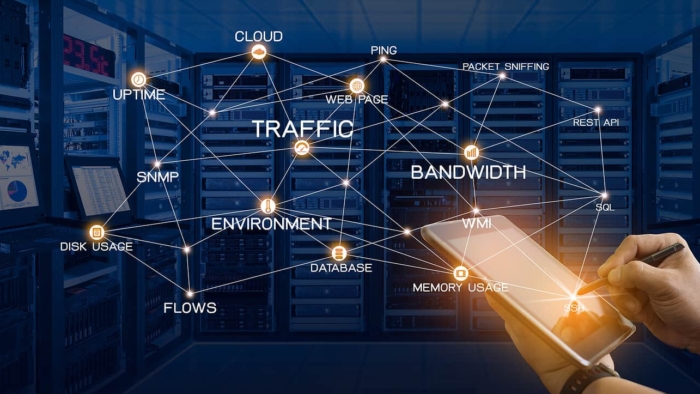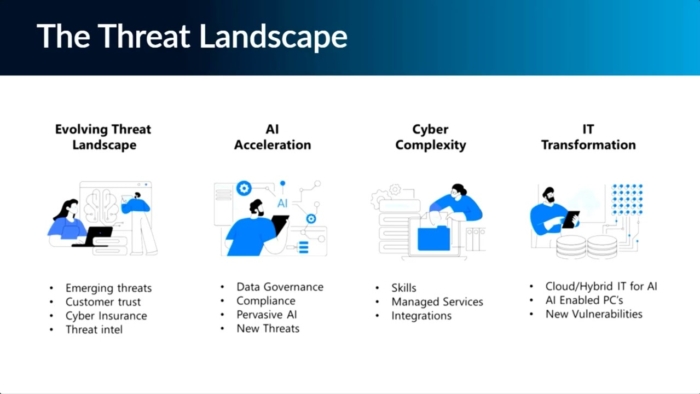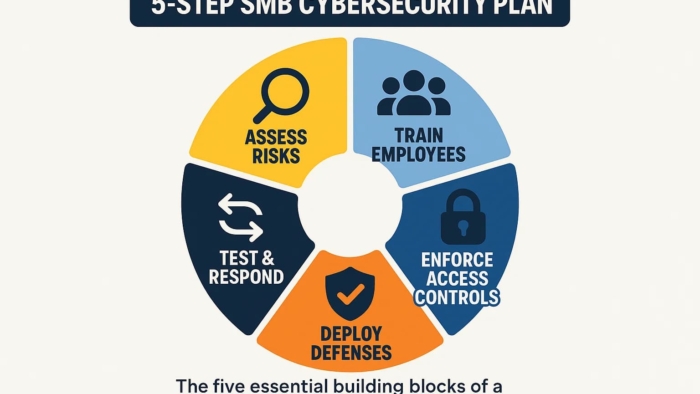
Network-Management-Tool

5 Powerful Network Management Tools That Boost Performance

 Why Network Management Matter

In 2025, businesses rely more than ever on seamless connectivity and reliable IT infrastructure. A single network downtime can cost companies thousands of dollars in lost productivity, delayed operations, and frustrated clients. That’s why network management tools have become indispensable for modern businesses.

Network management tools allow IT administrators to monitor, control, and optimize their network performance. From bandwidth allocation to security monitoring, these tools help businesses maintain smooth operations, prevent downtime, and strengthen security.

In this article, we’ll explore the 5 most powerful network management tools that can boost your business performance, highlight their key features, explain how to implement them effectively, and showcase their benefits — all available through Buy Software Hub, your trusted provider of enterprise-grade solutions.

1. SolarWinds Network Performance Monitor

SolarWinds is a market-leading solution for businesses of all sizes. It offers real-time monitoring, automated alerts, and in-depth analytics to keep your network running at peak performance.

Key Features:

  • Bandwidth and traffic analysis
  • Automated fault detection and alerts
  • Visual dashboards and reporting
  • Scalability for multiple sites and devices

SolarWinds is perfect for businesses that need a comprehensive view of network health and want to quickly identify bottlenecks or potential issues.

💬 CTA: Boost your network reliability today! Explore SolarWinds Network Performance Monitor at Buy Software Hub for fully licensed business deployment.

2. Cisco Meraki Dashboard

Cisco Meraki offers a cloud-based network management platform that combines security, monitoring, and configuration in a single interface. Its simplicity and robust analytics make it a favorite among IT teams.

Key Features:

  • Cloud-managed network devices (routers, switches, access points)
  • Detailed traffic analytics and application monitoring
  • Seamless integration with mobile and remote workers
  • Automatic firmware updates and security patches

Meraki is ideal for businesses with remote or hybrid teams, ensuring that all users enjoy fast, secure connections.

3. Nagios XI

Nagios is a powerful open-source network monitoring tool tailored for businesses that need customizable monitoring solutions. It helps IT admins identify, troubleshoot, and prevent network issues before they impact operations.

Key Features:

  • Server, switch, and application monitoring
  • Custom alerts and dashboards
  • Historical reporting for trend analysis
  • Integration with third-party plugins

Nagios is perfect for companies that want granular control over their network infrastructure and enjoy scalable, flexible monitoring.

4. Paessler PRTG Network Monitor

PRTG is an all-in-one monitoring solution that tracks network performance, bandwidth usage, and system health. Its user-friendly interface and advanced alert system make it an excellent choice for businesses of any size.

Key Features:

  • Bandwidth, uptime, and application monitoring
  • Automatic device discovery and sensor setup
  • Customizable dashboards and notifications
  • Multi-site and cloud network monitoring

PRTG allows IT teams to proactively manage their network, reduce downtime, and maintain productivity.

💬 CTA: Ensure your network performs at its best. Get PRTG Network Monitor through Buy Software Hub today and enjoy enterprise-grade monitoring at competitive pricing.

5. ManageEngine OpManager

ManageEngine OpManager is a holistic network monitoring solution that provides visibility into your entire IT infrastructure, including servers, switches, routers, and virtual machines.

Key Features:

  • Real-time network performance monitoring
  • Network configuration and fault management
  • Automatic alerts and reporting
  • Virtualization and cloud monitoring

OpManager is perfect for businesses looking for end-to-end network oversight, ensuring operational continuity and improved IT efficiency.

How to Implement Network Management Tools

Implementing a network management tool requires a strategic approach to maximize benefits:

  1. Assess Your Network Needs
  • Identify devices, servers, and applications that need monitoring.
  • Determine traffic loads and critical points in your infrastructure.
  1. Select the Right Tool
  • Choose a solution that matches your business size and IT expertise.
  • Consider scalability, cloud integration, and reporting features.
  1. Deploy & Configure
  • Install software on servers or cloud platforms as needed.
  • Set up alerts, monitoring policies, and dashboards for IT staff.
  1. Train Your Team
  • Ensure your IT staff knows how to read analytics, respond to alerts, and generate reports.
  • Regularly update policies to adapt to new network devices or expansions.
  1. Continuous Monitoring & Optimization
  • Regularly review network logs and analytics.
  • Adjust configurations and bandwidth allocations to optimize performance.

Benefits of Network Management Tools

Using enterprise-grade network management tools provides multiple tangible benefits for businesses:

  • Improved Network Performance – Detect and eliminate bottlenecks for faster connectivity.
  • Reduced Downtime – Proactively prevent issues before they affect operations.
  • Enhanced Security – Monitor suspicious activity and unauthorized access attempts.
  • Cost Savings – Optimize bandwidth usage and prevent unnecessary hardware or upgrades.
  • Simplified IT Management – Centralized dashboards make it easy for IT teams to manage complex networks.

With the right tool, your IT department spends less time firefighting issues and more time driving business growth.

Conclusion

Efficient network management is no longer optional — it’s a business-critical component of modern operations. Tools like SolarWinds, Cisco Meraki, Nagios, PRTG, and ManageEngine OpManager offer scalable, robust solutions that help businesses maintain secure, high-performing networks.

Investing in licensed, enterprise-grade network management software ensures your infrastructure stays reliable, efficient, and prepared for future growth.

💻 Don’t wait for network downtime to impact your business.

Choose Buy Software Hub today to explore these top-tier network management tools, get licensed software, and receive expert guidance on installation and configuration.

Optimize your network, boost performance, and safeguard your operations — starting today!
SolarWinds-vs-PRTG-

How SolarWinds and PRTG Keep Your Network Running 24/7

Introduction

In today’s hyper-connected business world, network downtime is more than just an inconvenience — it’s a direct hit to productivity, revenue, and customer trust. Whether you manage a small office or a multinational IT infrastructure, ensuring continuous network performance is critical.

Enter network monitoring tools like SolarWinds and PRTG Network Monitor. These platforms provide businesses with real-time insights, automated alerts, and detailed analytics, allowing IT teams to prevent outages, optimize performance, and maintain a secure, stable environment around the clock.

In this guide, we’ll explore how these industry-leading tools keep your network running 24/7, explain how to implement them effectively, and highlight the tangible benefits they deliver.

Understanding Network Monitoring

Network monitoring is the practice of tracking the health, performance, and security of your IT infrastructure. It involves continuously analyzing routers, switches, servers, cloud systems, and endpoints to detect problems before they escalate.

Without a proper monitoring system, businesses risk:

  • Unexpected downtime affecting employees and clients
  • Slow network performance that reduces productivity
  • Data loss or security breaches due to unnoticed vulnerabilities

Tools like SolarWinds and PRTG address these challenges by giving IT administrators a centralized view of the network, combined with intelligent automation and proactive alerts.

 SolarWinds: Enterprise-Level Network Intelligence

SolarWinds is a comprehensive network monitoring platform widely trusted by IT teams for its scalability and depth of features.

Key Features:

  • Real-Time Network Performance Monitoring: Tracks bandwidth usage, server load, and application performance.
  • Automated Alerts & Notifications: Sends instant alerts for latency, downtime, or unusual activity.
  • Customizable Dashboards: Provides IT teams with clear visuals of network health across all devices.
  • Root Cause Analysis: Quickly identifies and resolves the underlying causes of network issues.
  • Security & Compliance Tracking: Detects potential vulnerabilities and ensures adherence to IT policies.

💬 CTA: Experience SolarWinds’ advanced monitoring capabilities. Protect your network with industry-leading software available at Buy Software Hub.

How SolarWinds Helps Businesses:

SolarWinds is particularly effective for large enterprises with complex networks. By providing predictive analytics and automated reporting, IT teams can reduce downtime, optimize resource allocation, and make data-driven decisions about infrastructure upgrades.

 PRTG Network Monitor: All-in-One Visibility

PRTG is a versatile, user-friendly monitoring tool suited for small to medium businesses, although it scales well for larger environments too.

Key Features:

  • Bandwidth & Traffic Analysis: Monitors network load in real time to prevent congestion.
  • Uptime Monitoring: Tracks the status of servers, switches, and applications 24/7.
  • Custom Alerts & Thresholds: Notifies IT staff immediately when metrics exceed defined limits.
  • Sensor-Based Architecture: Each device or service can be monitored via individual “sensors” for granular visibility.
  • Flexible Deployment: Offers both cloud-based and on-premises monitoring options.

💬 CTA: Secure your network with PRTG’s intuitive monitoring platform. Check licensing options and setup support at Buy Software Hub.

PRTG’s modular sensor-based approach allows businesses to focus on critical systems first, ensuring uptime for the most essential applications while gradually expanding coverage as the network grows.

 How to Implement SolarWinds and PRTG

Implementing network monitoring tools doesn’t have to be complicated. Here’s a step-by-step approach to maximize value:

1. Assess Your Network Infrastructure

Identify all devices, servers, and applications that require monitoring. This ensures no critical systems are left unprotected.

2. Choose the Right Tool for Your Needs

  • Large enterprises or multi-branch setups → SolarWinds
  • SMEs or smaller networks → PRTG

3. Deploy and Configure

  • Install the software on a dedicated server or in the cloud.
  • Configure sensors, thresholds, and alerts based on your operational requirements.

4. Set Up Dashboards and Reporting

Customize dashboards for real-time visibility. Schedule automated reports for executive teams to track performance trends and KPIs.

5. Integrate Security Measures

Ensure the monitoring system is integrated with firewalls, endpoint protection, and antivirus solutions for end-to-end security.

6. Train IT Staff

Educate your IT team on alert handling, incident response, and optimization tips for better performance and uptime.

💬 CTA: Let Buy Software Hub assist you in deploying SolarWinds or PRTG. We offer full installation, configuration, and ongoing support to ensure your network runs flawlessly.

 Benefits of Continuous Network Monitoring

Investing in SolarWinds or PRTG delivers tangible advantages for your business:

1. 24/7 Network Uptime

Monitoring alerts IT teams to potential issues before they cause downtime, keeping business operations smooth.

2. Proactive Issue Resolution

Detect bottlenecks, failed hardware, or bandwidth spikes early — reducing service interruptions.

3. Enhanced Security Posture

Track unusual activity, monitor device access, and integrate with antivirus software to reduce vulnerabilities.

4. Data-Driven Decision Making

Comprehensive reports and analytics allow IT teams to make informed decisions about infrastructure scaling, software updates, and hardware investments.

5. Cost Efficiency

Preventing downtime and reducing manual troubleshooting saves money and protects revenue streams.

6. Improved Employee Productivity

A stable, fast network ensures employees can focus on their work without tech interruptions.

 Conclusion

A business’s network is its digital backbone. Without real-time monitoring, even minor issues can escalate into major disruptions. Tools like SolarWinds and PRTG provide the intelligence, automation, and visibility necessary to keep networks running 24/7.

From large enterprises requiring predictive analytics to SMEs needing a simple, intuitive platform, these solutions ensure continuous performance, security, and efficiency.

Don’t wait for downtime to strike. Protect your business network today:

Get genuine licenses for SolarWinds and PRTG
Expert installation and configuration
24/7 monitoring and support
Customizable dashboards and reports

Trust Buy Software Hub to secure your network with the best monitoring solutions available — and experience true peace of mind knowing your business is always connected and fully protected.

network-monitoringjpg

🌐 Why Network Monitoring Is the Secret to IT Success in 2025

The Hidden Engine Behind Business IT

In 2025, businesses rely more than ever on digital infrastructure to operate, communicate, and grow. From cloud applications to remote desktops, every connection and system plays a critical role. Yet, many companies overlook one of the most crucial pillars of IT success: network monitoring.

Network monitoring is the continuous observation of a company’s network for performance, security, and operational issues. Think of it as a digital health check-up that ensures your infrastructure is running smoothly and securely — before small glitches become business-breaking disasters.

Proper network monitoring allows IT teams to detect problems proactively, optimize performance, and secure data, making it a secret weapon for business efficiency and resilience.

💬 CTA: Ensure your network operates flawlessly. Explore network monitoring solutions at Buy Software Hub today!

🧩 What Network Monitoring Entails

At its core, network monitoring tracks devices, traffic, applications, and endpoints within a network. It provides actionable insights into performance, uptime, and security.

Key Components of Network Monitoring:

  1. Real-Time Traffic Analysis

    • Monitors data packets traveling across your network

    • Detects bottlenecks, unauthorized access, and unusual activity

  2. Device & Endpoint Monitoring

    • Tracks servers, switches, routers, and employee devices

    • Alerts IT teams if a device goes offline or behaves abnormally

  3. Application Performance Monitoring (APM)

    • Measures response times, uptime, and reliability of critical applications

    • Helps optimize cloud-based tools and business software

  4. Security Monitoring

    • Detects intrusion attempts, malware activity, and ransomware signals

    • Integrates with firewalls, antivirus, and endpoint protection for layered defense

  5. Automated Alerts & Reporting

    • Sends notifications to IT teams for anomalies or failures

    • Generates reports for performance reviews, compliance, and capacity planning

Why This Matters in 2025

As hybrid work, cloud apps, and IoT devices expand, network complexity grows exponentially. Without monitoring, downtime, cyber threats, and data loss can silently cripple operations. Network monitoring is no longer optional — it’s critical to business continuity.

💬 CTA: Protect your infrastructure and gain real-time insights with network monitoring tools from Buy Software Hub.

⚙️ How to Use and Implement Network Monitoring

Implementing network monitoring doesn’t have to be overwhelming. Here’s a practical roadmap for businesses of any size:

Step 1: Identify Critical Assets

  • Map out all devices, servers, and applications that keep your business running.

  • Prioritize monitoring for high-value assets and sensitive data flows.

Step 2: Choose the Right Network Monitoring Tool

  • Key vendors to consider: SolarWinds, Cisco Meraki, Nagios, Paessler PRTG

  • Evaluate features: traffic analysis, real-time alerts, cloud integration, and scalability.

Step 3: Configure Alerts and Thresholds

  • Set performance baselines for your network

  • Define thresholds for bandwidth, latency, and device health

  • Ensure IT teams receive instant alerts for deviations

Step 4: Centralize Management

  • Use a unified dashboard to monitor your entire network

  • Incorporate remote endpoints and cloud infrastructure for holistic oversight

Step 5: Analyze and Act

  • Review reports to identify trends and recurring issues

  • Address performance bottlenecks, security gaps, and network inefficiencies

  • Adjust bandwidth allocation, firewall rules, and access permissions as needed

Step 6: Continuous Optimization

  • Update monitoring policies as your network grows

  • Integrate with other IT tools: antivirus, endpoint management, and backup systems

💬 CTA: Discover network monitoring solutions that simplify setup and give real-time visibility. Get started with Buy Software Hub today!

💡 Benefits of Network Monitoring for Businesses

  1. Proactive Problem Detection

    • Catch issues before they disrupt operations

    • Reduce downtime and prevent cascading failures

  2. Enhanced Security

    • Identify malware, ransomware, and unauthorized access

    • Integrates seamlessly with antivirus and firewall solutions

  3. Improved Performance & Efficiency

    • Detect bandwidth hogs and latency issues

    • Optimize application and network performance for employees and clients

  4. Cost Savings

    • Prevent expensive emergency repairs or system replacements

    • Extend the lifespan of network hardware and software

  5. Regulatory Compliance

    • Maintain audit trails and reporting for GDPR, HIPAA, or ISO standards

    • Demonstrate robust IT governance to stakeholders

  6. Remote Management & Scalability

    • Monitor devices across multiple offices or remote employees

    • Scale effortlessly as your business grows or adopts cloud infrastructure

  7. Data-Driven Decision Making

    • Reports provide insights for capacity planning, upgrades, and IT strategy

    • Helps IT teams make informed, cost-effective choices

🔍 Common Challenges and How to Overcome Them

While network monitoring is powerful, businesses often face challenges:

  • Alert Overload: Too many notifications can overwhelm IT staff.
    Solution: Configure thresholds and prioritize alerts for critical issues.

  • Integration Complexity: Multiple vendors and systems may not sync.
    Solution: Choose monitoring tools that integrate with existing IT infrastructure.

  • Resource Constraints: Small IT teams may struggle with 24/7 monitoring.
    Solution: Cloud-based monitoring platforms and managed services reduce overhead.

🚀 Conclusion: Why 2025 Is the Year to Prioritize Network Monitoring

In today’s fast-paced, digital-first world, network downtime or a security breach can cost businesses thousands or even millions in lost revenue and reputation. Network monitoring is your shield, early-warning system, and efficiency booster all in one.

By investing in the right monitoring tools and integrating them into your IT strategy, you can proactively prevent problems, strengthen security, and maximize operational performance.

Network monitoring is not just a technical requirement — it’s a business advantage, giving your team the visibility and control to make smarter, faster decisions.

🔐 Call to Action

💻 Don’t let hidden network issues slow your business down.

At Buy Software Hub, we offer trusted network monitoring solutions from:

  • SolarWinds

  • Cisco Meraki

  • Nagios

  • Paessler PRTG

✅ Get real-time insights, centralized management, and robust security features.
✅ Setup support and expert guidance for businesses of all sizes.
✅ Cloud-based and on-premise options for flexibility and scalability.

Start monitoring your network today and ensure your IT infrastructure is secure, efficient, and future-ready.

Explore Network Monitoring Solutions Now at Buy Software Hub

🕶️ The 2025 Cyber Threat Landscape – What Businesses Must Prepare For

🕶️ The Cyber Threat Landscape – What Businesses Must Prepare For

🔍 Introduction: The Urgent Reality of Cyber Threats

In the digital ecosystem is more complex — and riskier — than ever. Cybercriminals are not just opportunists; they are sophisticated, AI-enabled, and globally coordinated. For businesses of all sizes, the stakes are high: data breaches, ransomware attacks, and system downtimes can cost millions in revenue and irreparable reputational damage.

Understanding the evolving cyber threat landscape is the first step toward safeguarding your business. Companies can no longer rely on generic antivirus software or outdated security protocols. Today’s threats demand proactive, multi-layered security solutions designed for modern IT infrastructures.

In this guide, we’ll explore the key cyber threats, how businesses can prepare, and how trusted solutions from Buy Software Hub can fortify your organization against attacks.

🧩 Key Cyber Threats Businesses Face

Cybercrime continues to evolve at lightning speed. Here are the most pressing threats businesses need to be aware of this year:

1. Ransomware Evolution

Ransomware attacks have grown increasingly sophisticated, targeting cloud infrastructure and hybrid systems. Attackers now deploy AI-driven encryption methods, making detection more difficult. Businesses that delay security updates or use unlicensed software are prime targets.

2. AI-Powered Phishing & Social Engineering

Gone are the days of poorly written spam emails. Modern phishing attempts use AI to mimic human communication, making fraudulent emails, chat messages, and calls nearly indistinguishable from legitimate interactions.

3. Supply Chain Vulnerabilities

Businesses increasingly rely on third-party vendors and SaaS platforms. Compromised suppliers can introduce malware or ransomware into your systems without direct contact, making supply chain security a critical concern.

4. Insider Threats

Even well-trained employees can pose a risk. Malicious insiders, careless staff, or compromised credentials can lead to data leaks, fraud, and operational disruption.

5. IoT & Remote Work Exploits

As IoT devices proliferate and remote work remains common, unsecured networks become gateways for cyberattacks. Attackers can exploit weak devices, unprotected home networks, and outdated protocols to gain access to business systems.

💬 CTA: Don’t wait until it’s too late. Protect your business from cyber threats today with enterprise-grade antivirus and security solutions from Buy Software Hub.

⚙️ How Businesses Can Prepare

Mitigating cyber risks in requires a multi-layered approach combining technology, policies, and employee awareness. Here’s a step-by-step preparation guide:

Step 1: Conduct a Comprehensive Risk Assessment

Identify your critical assets, such as customer data, financial records, and intellectual property. Map potential vulnerabilities, including endpoints, cloud storage, and third-party integrations.

Step 2: Deploy Enterprise-Grade Antivirus & Security Software

Install licensed antivirus solutions from trusted vendors like Kaspersky, AVG, Bitdefender, or Norton. Focus on features like:

  • Real-time threat detection 
  • AI-powered malware prevention 
  • Endpoint protection for remote employees 
  • Ransomware shields and cloud monitoring 

Step 3: Implement Multi-Factor Authentication (MFA)

Secure all logins with MFA. Even if passwords are stolen, an additional verification layer can prevent unauthorized access.

Step 4: Establish Cybersecurity Policies & Training

Educate employees on:

  • Recognizing phishing attempts 
  • Safe remote work practices 
  • Data handling protocols 

Step 5: Regular Backups & Business Continuity Planning

Use cloud-based remote backup solutions and develop a Business Continuity Plan (BCP). This ensures minimal disruption in case of ransomware attacks or system failures.

Step 6: Continuous Monitoring & Threat Intelligence

Leverage software that provides real-time monitoring, automated alerts, and threat intelligence analytics. Being proactive is far more effective than reactive incident response.

💬 CTA: Secure your endpoints and networks now. Explore Buy Software Hub’s suite of licensed antivirus and cybersecurity solutions tailored for businesses of all sizes.

💡 Benefits of Preparing for Cyber Threats

Investing in robust cybersecurity strategies and solutions brings tangible benefits:

Business Continuity: Prevent downtime caused by ransomware, malware, or network breaches.
Data Protection: Safeguard sensitive client, financial, and intellectual property data.
Regulatory Compliance: Stay aligned with GDPR, HIPAA, and ISO cybersecurity standards.
Cost Savings: Reduce potential costs associated with data breaches, fines, and reputational loss.
Employee Confidence: A secure work environment increases productivity and trust.
Future-Ready Infrastructure: Prepare for emerging threats like AI-powered attacks and advanced persistent threats (APTs).

🧰 Implementing Cybersecurity Solutions: Practical Tips

  1. Choose a Centralized Management Platform – Monitor and update all endpoints from a single console. 
  2. Prioritize Cloud Security – Hybrid cloud environments must be secured with encryption and threat monitoring. 
  3. Integrate Network Management Tools – Bandwidth control, firewall management, and intrusion detection are key layers. 
  4. Regularly Audit & Test Security Protocols – Conduct internal simulations and penetration testing to identify vulnerabilities. 
  5. Stay Updated – Ensure your antivirus, operating systems, and software applications are always patched. 

By combining these practices with licensed solutions from Buy Software Hub, businesses can establish a proactive, layered defense that mitigates risk in real-time.

🚀 Conclusion

The 2025 cyber threat landscape is dynamic, complex, and high-stakes. Businesses cannot afford to rely on outdated protection or ignore evolving attack vectors. From ransomware to AI-driven phishing, the threats are real — but with the right strategy, licensed antivirus software, and proactive policies, organizations can defend themselves and thrive securely.

Cybersecurity is no longer optional. It’s a strategic advantage — the difference between operational continuity and catastrophic disruption.

🔐 Call to Action

💻 Take control of your cybersecurity today.

With Buy Software Hub, you gain access to:

  • 100% licensed antivirus and endpoint protection (Kaspersky, AVG, Bitdefender, Norton) 
  • Remote backup and business continuity solutions 
  • Network management tools for secure, optimized performance 
  • Expert installation, support, and guidance 

Protect your business from evolving cyber threats. Visit Buy Software Hub and secure your digital future now.

case study

📈 Case Study: How a Small Business Stopped a Major Cyber Attack

Cyberattacks are no longer the exclusive concern of large corporations — small businesses are increasingly targeted. In fact, 43% of cyberattacks in 2025 are aimed at small and medium-sized enterprises (SMEs). These attacks can cripple operations, steal sensitive data, and damage customer trust.

This case study explores how BrightWave Marketing, a small digital agency, successfully thwarted a major cyberattack in 2025 using licensed antivirus and cybersecurity solutions from Buy Software Hub. Their story demonstrates that with the right tools and strategy, even small businesses can defend against sophisticated threats.

🧩 The Challenge: A Sudden Threat

BrightWave Marketing, with just 15 employees, primarily relied on cloud collaboration tools and client databases for daily operations. One morning, they noticed unusual network activity:

  • Multiple unauthorized login attempts 
  • Suspicious file encryption on employee devices 
  • Phishing emails bypassing standard filters 

The team quickly realized they were under a ransomware attack, which could encrypt all client files and halt operations. With projects in progress and sensitive client data at risk, time was critical.

⚠️ CTA: Don’t wait until it’s too late! Secure your business against ransomware with licensed antivirus solutions from Buy Software Hub.

⚡ The Solution: Licensed Cybersecurity Tools in Action

BrightWave worked with Buy Software Hub to implement a multi-layered defense strategy. The solution included:

1. Kaspersky Endpoint Security Cloud Plus

  • Real-time monitoring of all devices 
  • AI-driven detection of malware and ransomware 
  • Automated device isolation to prevent spread 

2. AVG Business Security Cloud Edition

  • Anti-phishing protection for emails 
  • Cloud management console for centralized control 
  • Behavior-based detection to catch unknown threats 

3. Employee Training & Security Protocols

  • Phishing awareness workshops 
  • Enforced password policies 
  • Multi-factor authentication for critical systems 

Within hours, the combination of licensed software, centralized monitoring, and staff awareness neutralized the threat before any client data was compromised.

🛠️ How They Implemented the Protection

The implementation process was straightforward but strategic:

Step 1: Assess the Network

BrightWave conducted a full audit of their systems, identifying vulnerable endpoints and legacy software that could be exploited.

Step 2: Deploy Antivirus Across Devices

Using the cloud console, Buy Software Hub assisted in installing Kaspersky and AVG on all laptops, desktops, and servers. Automatic updates were enabled to ensure real-time protection.

Step 3: Configure Threat Response Policies

  • Devices with suspicious activity were automatically quarantined 
  • Email filters were enhanced to block phishing links 
  • Scheduled scans were set for all endpoints during off-hours 

Step 4: Train Employees

A quick training session showed staff how to spot phishing emails, avoid suspicious downloads, and report potential threats immediately.

Step 5: Continuous Monitoring

Centralized dashboards allowed BrightWave’s IT admin to track threats in real time and generate reports for compliance audits.

💬 CTA: Learn how your business can implement the same proactive security measures with expert guidance from Buy Software Hub.

💡 Benefits Realized

The impact of implementing licensed cybersecurity tools and protocols was immediate and measurable:

1. Ransomware Prevented

No client files were encrypted, and the attack was fully neutralized within hours.

2. Business Continuity Maintained

Projects continued without downtime, preserving client trust and revenue streams.

3. Increased Employee Awareness

Staff became vigilant against phishing, reducing the risk of human error in future attacks.

4. Centralized Security Management

IT administrators could now monitor all devices in one dashboard, simplifying compliance reporting.

5. Cost Savings

Avoided potential losses from ransom payments, downtime, and client compensation — demonstrating a clear ROI for licensed antivirus investment.

📈 Lessons Learned: Why Small Businesses Can’t Ignore Cybersecurity

  1. Small Businesses Are Prime Targets – Hackers know SMEs often have weaker defenses. 
  2. Proactive Measures Save Money – Investing in licensed antivirus is far cheaper than paying for recovery after an attack. 
  3. Employee Training is Crucial – Technology alone isn’t enough; human awareness completes the defense. 
  4. Centralized Monitoring is Key – Being able to see all endpoints and respond quickly prevents attacks from spreading. 

BrightWave’s experience proves that with proper planning, even a small team can implement enterprise-level security.

🔐 Conclusion

Cyberattacks don’t discriminate by business size. However, small businesses like BrightWave Marketing can successfully prevent major breaches by using licensed antivirus solutions, proper policies, and employee training.

2025 is a year where cybersecurity should be treated as a core business function, not just an IT responsibility. By adopting a proactive, layered approach, your business can stay protected, maintain client trust, and avoid costly downtime.

🚀 Call to Action

Protect your business like BrightWave did.

✅ Get licensed antivirus software from Kaspersky, AVG, Bitdefender, and more
✅ Implement centralized monitoring and threat management
✅ Train your employees in cyber hygiene and phishing awareness

💻 Visit Buy Software Hub today to secure your small business against cyberattacks and maintain uninterrupted operations in 2025 and beyond.