
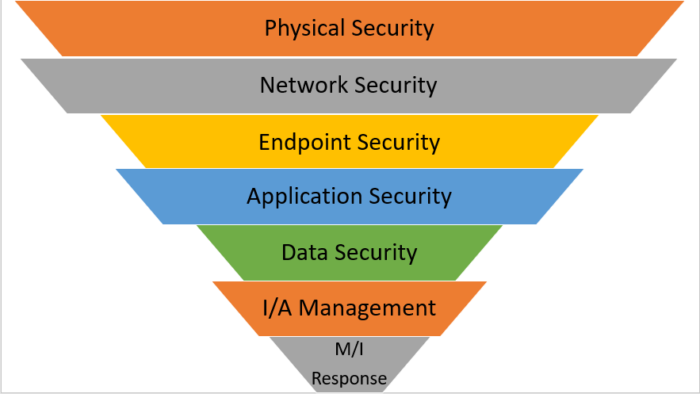
multi layers security

🧰 Multi-Layered Protection: How to Build a Cybersecurity Fortress

🔍 Why Multi-Layered Cybersecurity Is a Must in 2025

In today’s digital landscape, cyber threats are no longer isolated attacks — they’re sophisticated, coordinated, and relentless. From ransomware to phishing scams and insider threats, businesses face attacks from every angle. A single security layer is no longer sufficient; your organization needs a multi-layered cybersecurity strategy.

Think of it as building a fortress: the stronger and more layered the defenses, the less likely attackers are to breach your walls. Multi-layered protection combines antivirus, firewalls, endpoint security, email and network monitoring, and employee training — creating a holistic shield for your business operations.

At Buy Software Hub, we specialize in providing genuine, licensed security software that forms the backbone of these multi-layered defenses.

🛡️ Understanding Multi-Layered Cybersecurity

A multi-layered cybersecurity approach is all about defense in depth. Each layer works independently but also complements the others. Let’s break down the critical layers every business should implement:

1. Antivirus and Endpoint Protection

Antivirus software is your first line of defense, protecting desktops, laptops, and servers from malware, ransomware, and other threats. Modern endpoint protection goes beyond traditional scanning:

  • AI-driven real-time threat detection

  • Behavioral monitoring to catch zero-day attacks

  • Automated quarantine of suspicious files

💬 CTA: Protect your endpoints today with Kaspersky or AVG business licenses from Buy Software Hub — trusted by businesses worldwide.

2. Firewalls and Network Security

Firewalls act as digital gatekeepers, controlling traffic between internal systems and external networks. Advanced business firewalls:

  • Block unauthorized access

  • Monitor network traffic for anomalies

  • Integrate with endpoint software for holistic monitoring

Network management tools from brands like SolarWinds or Cisco Meraki, available at Buy Software Hub, help businesses proactively detect and neutralize threats before they cause damage.

3. Email and Web Security

Phishing attacks remain the top entry point for cybercriminals. Multi-layered protection requires:

  • Email filtering to detect suspicious attachments and links

  • Web filtering to block malicious websites

  • Real-time threat alerts

Solutions from AVG, Kaspersky, and Norton provide enterprise-grade email and web protection to keep employees and clients safe.

4. Data Encryption and Remote Backup

Data is your most valuable asset. Multi-layered security ensures that even if a breach occurs, your information remains protected:

  • Encryption: Secures sensitive files during storage and transit

  • Remote Backup: Cloud-based backups from providers like Acronis or Veeam ensure rapid recovery after incidents

💬 CTA: Safeguard your critical data today with Buy Software Hub’s remote backup solutions — secure, automated, and reliable.

5. Employee Awareness and Training

Even the best software can’t prevent human error. Regular training empowers employees to:

  • Identify phishing emails and scams

  • Use secure passwords and multi-factor authentication

  • Report suspicious activity promptly

Cybersecurity is only as strong as its weakest link — and often, that’s human behavior.

6. Continuous Monitoring and Threat Intelligence

A multi-layered defense is not “set it and forget it.” Continuous monitoring:

  • Detects anomalies in real-time

  • Provides insights into attack patterns

  • Supports proactive defense measures

Cloud-based dashboards and security analytics tools help IT teams manage threats efficiently, ensuring rapid response to any incident.

⚙️ How to Implement Multi-Layered Protection in Your Business

Step 1: Assess Risks and Requirements

Conduct a comprehensive cybersecurity audit to identify:

  • Number of endpoints and servers

  • Sensitive data locations

  • Potential attack vectors

Step 2: Choose Licensed, Enterprise-Grade Security Tools

Select solutions that integrate well:

  • Antivirus & endpoint protection: Kaspersky, AVG, Bitdefender

  • Firewalls and network tools: SolarWinds, Cisco Meraki

  • Backup & recovery: Acronis, Veeam

  • Collaboration & remote tools: Microsoft Teams, AnyDesk, TeamViewer

Step 3: Deploy and Configure

Install antivirus across all devices, configure firewalls, and set up email and web security rules. Automate updates wherever possible to minimize vulnerabilities.

Step 4: Train Employees

Run cybersecurity awareness programs and enforce policies such as strong passwords, 2FA, and reporting protocols.

Step 5: Monitor and Review

Use dashboards to track threats, scan reports, and system health. Schedule quarterly audits to identify gaps and improve defenses.

💡 Benefits of Multi-Layered Cybersecurity

  • 🔒 Comprehensive Protection: Multiple security layers reduce the chance of successful attacks.

  • Minimized Downtime: Quick detection and automated responses prevent operational disruption.

  • 📈 Compliance and Trust: Protect sensitive data to meet GDPR, HIPAA, or ISO standards.

  • 💸 Cost Efficiency: Preventing breaches saves millions compared to post-attack recovery.

  • 🧠 Employee Confidence: Staff feel secure and empowered to perform at their best.

Multi-layered cybersecurity transforms risk management from reactive to proactive — making businesses resilient against modern threats.

🔚 Conclusion

Building a cybersecurity fortress in 2025 requires more than just antivirus software. It’s about combining endpoint protection, firewalls, web and email security, encryption, backups, employee training, and continuous monitoring into a cohesive strategy.

Investing in multi-layered protection isn’t an expense — it’s a business-critical investment that safeguards your operations, reputation, and customer trust.

💬 CTA: Start building your cybersecurity fortress today with Buy Software Hub’s comprehensive security solutions. Licensed, reliable, and tailored for businesses of every size. Protect your data, protect your business.
cloud based antivirus

🌍 Cloud-Based Antivirus: Why Businesses Are Switching in 2025

In 2025, businesses face an increasingly complex digital landscape. Cyberattacks are more sophisticated, ransomware is growing in scale, and endpoint vulnerabilities are everywhere. Traditional on-premise antivirus solutions, while reliable, often struggle to keep pace with the dynamic threat environment.

This is why cloud-based antivirus solutions are becoming the go-to choice for businesses of all sizes. With cloud security, companies gain real-time threat detection, centralized management, and seamless scalability, all while reducing hardware costs and IT overhead.

In this guide, we’ll explore why businesses are making the switch to cloud-based antivirus, how to implement it effectively, and the tangible benefits your organization can gain.

🛡️ What is Cloud-Based Antivirus?

Cloud-based antivirus is a security solution where malware detection and updates are managed via the cloud, rather than locally on each device. This architecture allows IT teams to monitor endpoints, deploy updates, and respond to threats in real time — regardless of location.

Unlike traditional antivirus:

  • There’s no need for constant manual updates on every device.

  • Threat intelligence is updated instantly across all endpoints.

  • Remote workforces and multi-branch organizations can be secured from a single console.

Why Businesses Are Switching

  1. Remote & Hybrid Workforce Support
    Cloud-based antivirus works seamlessly for employees working from home, co-working spaces, or multiple office locations.

  2. Automatic Updates & Threat Intelligence
    With cyber threats evolving every day, cloud solutions provide continuous AI-driven protection without manual intervention.

  3. Lower IT Overhead
    Since processing and updates happen in the cloud, businesses spend less on local servers, maintenance, and software management.

💬 CTA: Protect your business from evolving threats. Explore licensed cloud-based antivirus solutions at Buy Software Hub today.

🌐 Key Features of Cloud-Based Antivirus

When selecting a cloud-based antivirus solution, look for the following features:

1. Real-Time Threat Detection

Cloud antivirus platforms use AI and machine learning to detect malware, ransomware, and phishing attempts as they occur.

2. Centralized Management Console

IT teams can monitor all devices, enforce security policies, and push updates from a single web-based dashboard.

3. Endpoint Security & Device Control

Admins can manage laptops, desktops, servers, and even mobile devices — restricting USB usage, preventing unauthorized software installation, and encrypting sensitive data.

4. Cloud Threat Intelligence

Advanced cloud antivirus solutions analyze data across millions of endpoints globally, identifying new threats faster than traditional solutions.

5. Integration & Compatibility

Cloud-based antivirus often integrates with firewalls, VPNs, and other enterprise software for a complete security ecosystem.

6. Scalable Licensing

Cloud solutions allow businesses to add or remove endpoints with ease, making it ideal for growing organizations or seasonal workforce changes.

💬 CTA: Switch to cloud-based antivirus with confidence. Browse Kaspersky, AVG, and Bitdefender cloud solutions at Buy Software Hub — fully licensed and enterprise-ready.

⚙️ How to Use and Implement Cloud-Based Antivirus

Implementing cloud-based antivirus doesn’t have to be complicated. Here’s a step-by-step guide:

Step 1: Assess Your Environment

Identify all endpoints, servers, and network-connected devices. Determine how many users will need access, including remote employees.

Step 2: Choose the Right Solution

Select a cloud antivirus vendor based on your business size, risk profile, and desired features. Consider options from Kaspersky, AVG, Norton, or Bitdefender.

Step 3: Deploy Centralized Management Console

Install the management console on a secure server or cloud instance. This will serve as your command center for monitoring and updating endpoints.

Step 4: Install Endpoint Agents

Deploy lightweight agents on all employee devices. These agents communicate with the cloud for real-time scanning, updates, and reporting.

Step 5: Configure Security Policies

Set up rules for malware scanning, firewall settings, USB device control, and web filtering. Tailor policies for different departments or user roles.

Step 6: Train Employees

Educate staff on phishing, suspicious downloads, and safe browsing. Even cloud-based antivirus requires human vigilance to be most effective.

Step 7: Monitor & Update

Use your centralized console to track threats, apply updates, and generate reports. Cloud antivirus often updates automatically, reducing IT workload.

💬 CTA: Let our experts at Buy Software Hub help implement your cloud antivirus solution — fast, secure, and fully licensed.

💡 Benefits of Cloud-Based Antivirus

Switching to cloud-based antivirus delivers measurable advantages:

1. Real-Time Protection

Threat intelligence is updated constantly, so malware, ransomware, and phishing attempts are blocked before they can damage your network.

2. Simplified IT Management

IT teams manage all devices through a single console, reducing manual updates and maintenance.

3. Cost Efficiency

No need to maintain on-premise servers or constantly update software manually — cloud antivirus saves both money and time.

4. Remote Workforce Security

Cloud-based solutions allow secure access for remote employees, ensuring business continuity even in a distributed work environment.

5. Scalability & Flexibility

Add or remove users as your company grows. Cloud-based antivirus scales seamlessly without disrupting operations.

6. Compliance Assurance

Many cloud antivirus solutions help businesses meet data protection and industry compliance requirements like GDPR, HIPAA, and ISO standards.

🔒 Conclusion

In 2025, businesses cannot afford to rely on traditional antivirus alone. Cloud-based antivirus offers smarter, faster, and more efficient protection against modern cyber threats. By integrating AI-powered threat detection, real-time updates, centralized management, and seamless scalability, cloud antivirus is redefining business security.

Whether your company is a small startup, a medium-sized enterprise, or a large multinational, the switch to cloud-based antivirus provides peace of mind, cost savings, and robust security.

🚀 Call to Action

💻 Secure your business today with cloud-based antivirus from Buy Software Hub!

  • 100% licensed solutions from top brands: Kaspersky, AVG, Bitdefender, Norton

  • Centralized, cloud-based management for remote and in-office teams

  • Expert setup, deployment, and ongoing support

  • Scalable licensing to match your growth

Visit Buy Software Hub to get started — protect your business from cyber threats in 2025 and beyond.

software-security-issues

🔔 10 Signs Your Current Security Software Is Failing You

Why Your Security Software Might Not Be Enough

In today’s digital landscape, cyber threats evolve faster than ever. Businesses face ransomware, phishing, malware, and sophisticated attacks that can compromise sensitive data, disrupt operations, and damage reputations. Many companies assume that simply having antivirus or security software is enough — but in reality, not all security software offers the protection your business truly needs.

Outdated or insufficient solutions can leave critical gaps, giving cybercriminals opportunities to exploit weaknesses in your network. Understanding the signs of failing security software is essential for staying ahead of threats and safeguarding your organization.

This guide outlines the top 10 warning signs that your current security setup may be failing, and how switching to a licensed, enterprise-grade solution from Buy Software Hub can help you regain control, confidence, and protection.

🧩 1. Frequent Security Alerts Without Resolution

Receiving constant pop-ups or alerts from your antivirus can indicate that threats are not being fully neutralized. If your software repeatedly detects malware but fails to quarantine or remove it, your system remains vulnerable.

💬 CTA: Upgrade to fully licensed antivirus solutions like Kaspersky or AVG from Buy Software Hub, which automatically detect and neutralize threats in real time.

🧩 2. Slow System Performance

While security software adds a layer of protection, it should not cripple your systems. Excessively slow computers, delayed startup times, or lagging applications can signal that your software is outdated or poorly optimized, allowing certain threats to bypass protection while consuming resources.

🧩 3. Lack of Real-Time Protection

Modern cyber threats act instantly. If your antivirus only scans on demand or relies on scheduled updates, it may miss emerging malware or ransomware attacks. Real-time monitoring and AI-driven detection are now essential to defend your network effectively.

🧩 4. Missed Threats and Infections

If your team experiences repeated infections despite running security software, this is a clear red flag. Legacy or unlicensed software often fails to detect new viruses, polymorphic malware, or sophisticated phishing attempts.

💬 CTA: Invest in enterprise-grade antivirus solutions from Buy Software Hub that offer cutting-edge detection algorithms, behavioral monitoring, and proactive threat intelligence.

🧩 5. No Centralized Management Console

As businesses grow, manually managing security on every endpoint becomes unmanageable. If your software lacks a centralized dashboard for monitoring and policy enforcement, it’s difficult to ensure every device is fully protected, increasing the risk of breaches.

🧩 6. Outdated Virus Definitions

Cybercriminals constantly develop new attack methods. Security software that doesn’t update automatically with the latest virus definitions leaves your business exposed. Signs of outdated software include missed malware alerts, incompatible features, and frequent patching errors.

🧩 7. Weak Ransomware and Phishing Protection

Ransomware and phishing are among the top threats for businesses in 2025. If your current software doesn’t include behavior-based detection, email filtering, or web protection, you may be at risk of data encryption attacks or credential theft.

🧩 8. Limited or No Support for Remote Teams

With remote work becoming standard, security software must extend protection beyond the office. Software that cannot manage endpoints offsite or lacks remote monitoring tools leaves distributed teams vulnerable to attacks.

💬 CTA: Solutions like Kaspersky Endpoint Security Cloud and AVG Business Security provide secure remote deployment, monitoring, and management, keeping all employees safe regardless of location.

🧩 9. High Rate of False Positives or System Conflicts

Excessive false alarms, blocked applications, or software conflicts can indicate poor integration or outdated security technology. Reliable antivirus software should minimize false positives while maintaining maximum protection.

🧩 10. Non-Compliance With Regulatory Standards

Businesses handling sensitive data must comply with industry regulations (GDPR, HIPAA, PCI DSS). Security software that does not provide adequate data protection, reporting, and auditing features could put your organization at risk of fines or reputational damage.

How to Use and Implement the Right Security Software

Step 1: Conduct a Security Audit

Begin by assessing your current software, identifying gaps, and reviewing endpoint coverage, real-time protection, and patching processes.

Step 2: Select the Right Antivirus Solution

Choose a licensed, business-grade antivirus solution based on your company size, device count, and security requirements. Popular options include Kaspersky, AVG, Bitdefender, and Norton, all available through Buy Software Hub.

Step 3: Deploy Across All Endpoints

Install and configure the software on all workstations, laptops, servers, and remote devices. Use cloud management consoles for centralized monitoring and updates.

Step 4: Enable Real-Time Protection & Automated Updates

Activate all real-time scanning features, email/web filtering, and automatic virus definition updates to ensure continuous protection against evolving threats.

Step 5: Train Your Team

Educate employees on safe computing practices, phishing awareness, and reporting suspicious activity to reduce human error risks.

Step 6: Monitor and Adjust

Regularly review security dashboards, scan logs, and alerts. Update policies and settings as your business grows or new threats emerge.

Benefits of Upgrading to Enterprise-Grade Security

Comprehensive Protection: Guards against malware, ransomware, phishing, and zero-day attacks.
Centralized Control: Manage all endpoints from a single console, including remote devices.
Regulatory Compliance: Meets industry standards to protect sensitive data and avoid fines.
Reduced Downtime: Prevents infections that could halt operations or compromise productivity.
Scalable Solutions: Accommodates growth and remote work environments with flexible licensing.
Peace of Mind: Ensures your IT infrastructure is protected, letting you focus on business growth.

Conclusion

Ignoring the signs of failing security software is a risk no business can afford in 2025. From missed threats to outdated definitions and lack of compliance, weak security can leave your company vulnerable to costly cyberattacks.

By recognizing the warning signs and switching to licensed, business-grade antivirus solutions from Buy Software Hub, you can strengthen your defenses, protect sensitive data, and empower your employees to work securely — anywhere, anytime.

Call to Action

🔒 Don’t wait until it’s too late. Protect your business with the latest licensed antivirus solutions.

Visit Buy Software Hub today for:
✅ 100% genuine antivirus software from top vendors like Kaspersky, AVG, Bitdefender, and Norton
✅ Cloud-based deployment for easy management of all endpoints
✅ Expert installation, configuration, and ongoing support
✅ Affordable business pricing and volume licensing

Secure your business today — because prevention is always better than recovery.